Technical blog
Working with Claude Code in a Large Brownfield Enterprise Codebase
A practical write-up on using Claude Code in a large enterprise codebase, including context, tools, permissions, memory, skills, verification, and tradeoffs.
 Reading the chat window
Index
- Codebase
- Delegation
- What Claude Code Is
- An AI Agent as a Universal Interface into Multiple Systems
- Agentic Harness
- Design Work: The /specs Folder Standard
- My Observations of the process
- Do I Actually Save Time?
- Across the Whole SDLC
- Short history of LLM Research
- Further Reading
Codebase and Team
For the last year I’ve been using Claude Code in a large payments microservices environment: roughly 200 Go repositories plus a .NET legacy codebase for back-office apps, together adding up to a few million lines of code. The platform covers 64 payment providers and 175 payment methods across multiple regions, countries, and currencies. The database has thousands of tables, scripts, and stored procedures, again adding up to a few million lines of SQL.
The service layer is split between orchestrators, gateways, callbacks (Go), and back-office tools (.NET). The architecture is documented, but many details still live in code, data, environment, or people’s heads. Work is spread across multiple teams of roughly 10 people, mostly backend engineers with a few frontend engineers, a tester, and a delivery manager. We split engineering work into three main categories: writing specs from business requirements, developing features from specs, and managing releases. So the person who writes the spec does not write the code, and the person who wrote the code does not release it. We also have peer review. The same logic goes through multiple pairs of eyes before it gets merged to main. From an AI-agent perspective, the important part is that we often have a fairly good technical spec before any code is written, and that helps a lot.
My personal setup is Git Bash on Windows and VS Code. I have most of the repositories cloned locally. For tools, we use Sourcegraph, which indexes the whole codebase and is useful for code search, Splunk for logs, Jira for tracking work, and sqlcmd.
Across all this, Claude Code streamlined workflows, but it also raised questions on knowledge curation, trust, hallucinations, cognitive load and attention cost.
Delegation
Claude Code does not replace development work. In a large brownfield system, it shifts effort from manual execution to steering and verification. It speeds up search, drafting, branch setup, data digging, writing code, ad hoc queries, scripts, commands, and other repetitive work, but the gains show up only when the setup around the model is curated.
That setup is the work around the model: context lives outside the chat, permissions define hard boundaries, memory captures repeated corrections, skills turn workflows into pipelines, subagents isolate exploration, and every factual claim should be verified from code, docs, logs, or data.
The time cost and cognitive load does not disappear; it moves from typing and browser tab-switching to steering, reading, verification, and agent maintenance. Used this way, agents are worth keeping in the workflow: fast for exploration and routine work, useful for learning the large system, and strongest when the setup is curated and their output can be verified quickly.
What is Claude Code
Agent = Model + Harness. If you’re not the model, you’re the harness. — Viv Trivedy
Claude Code is an app with several interfaces, mostly centered on terminal use, that puts an AI model in an agentic loop with access to your filesystem, shell, and configurable external tools. It reads, writes, searches, and executes. In simple terms the loop is: think, call a tool, observe the result, think again, until the task is done or context is exhausted. More on what “thinking” means in History.
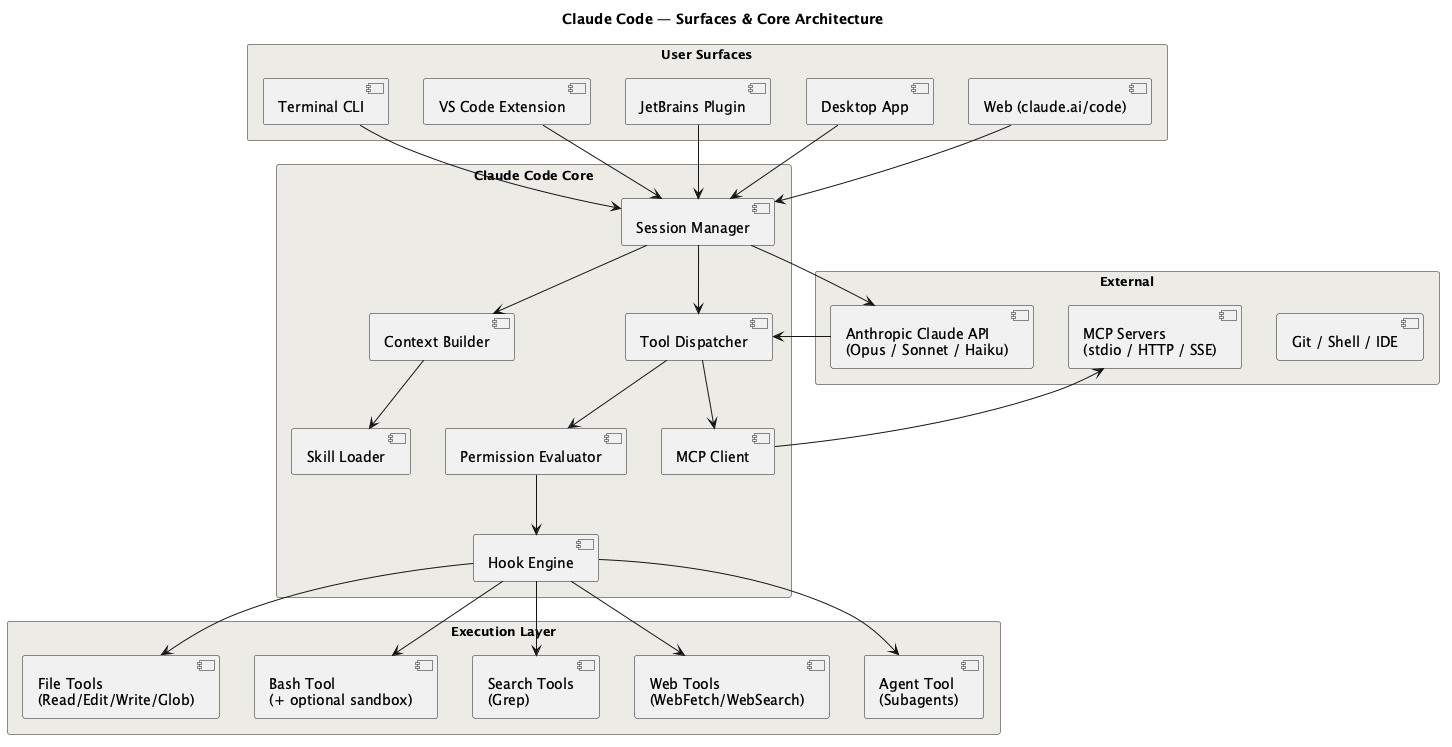
Claude Code has to coordinate several problems at once:
- The agent loop — turning a single request into a sequence of tool calls, with the model deciding the next step from the last result.
- Model access — authenticating to the model provider. Claude can connect directly to Anthropic through a plan or API. In enterprise setups it often runs through Vertex AI, AWS Bedrock, or a similar managed route with the organisation’s model whitelist and policy rules enforced.
- Permissions — every Read/Write/Bash/tool call is gated by policy before it runs, so the agent can’t quietly do something destructive. Tool calls will prompt the user. This is hard stop.
- Context — what the model sees, what gets compacted, and what has to live outside the chat.
- Context window management — keeping the finite window full of the right knowledge and compacting when it fills.
- Context supply — pulling relevant files, Jira tickets, and docs into that window for the task at hand.
- Tools — built-in file and shell tools, MCP servers, CLI tools, and direct API calls.
- Configuration and permissions — where Claude stores state, which actions prompt, and which actions are blocked.
- Memory, skills, and subagents — the reusable layer that turns repeated corrections into future defaults. Memory can define rules from session to session. This is soft stop in terms of permissions.
An AI Agent as a Universal Interface into Multiple Systems
The first concrete value Claude Code brought to me was connecting several systems in one command. Workflows scattered across the terminal, IDE, and browser tabs can be joined into one prompt.
My /go-story-kickoff skill is a small example. It takes a single Jira URL and runs the branch-setup sequence on its own:
jiramcp get_issue→ ticket details, the parent epic, and the service it belongs to.ls orchestrators/ | grep service→ finds the repository locallygit fetch --all --prune,git branch -r | grep <epic>→ confirm the epic branch existsgit checkout -b <epic>-<story> --no-track origin/<epic>git push -u origin <epic>-<story>- Open the browser to a pre-filled GitLab MR creation URL targeting the right parent branch
After branch setup, parallel subagents read the spec and explore the call chain, dependency-client contracts, and existing patterns. The result is a ready-to-work branch, a draft MR, and a main session loaded with the context from the skill and memory. From there I can reset context and move into implementation, testing, handoff, or deployment.
Nobody likes filling in timesheets every week, so I made an agent to do it. It is a routine copy-paste work that deserves automation. My /admin skill makes the task less miserable by running four data pulls in parallel:
get_Admin_worklogs (current week)       ─┐
get_Admin_worklogs (previous week)       │  fired simultaneously
get_gitlab_user_activity (git server one)        │
get_gitlab_user_activity (git server two) ─┘
call rss_feeder - CLI tool created by the agent for the agent
Through Jira MCP it checks the worklog format and recent codes. GitLab activity gives correlation, and rss_feeder provides my Jira activity feed. I even vibe-coded rss_feeder specifically for this workflow to get better precision. It took only a few sessions. The model then proposes the timesheet table for me to review instead of making me reconstruct the week from browser tabs. It is not an impressive demo, but it is useful: it removes a small recurring tax.
Seen this way, Claude Code becomes a window into the systems around a developer: “find me a valid user in the DB for this flow”, “how does this subsystem integrate with accounting?”, “show me the dependency graph for tickets in this epic from Jira”. The bottleneck becomes inference speed and trust. Fast models can make this feel natural. Slower models can make it quicker to open the browser tab and read the material yourself. Trust comes from strong guardrails in the skill and from my own knowledge of how the workflow should be processed.
Agentic Harness
Claude Code already provides the model and the tool loop. My work was deciding what it can see, what it can run, what it should remember, and when it has to stop and ask. That happens through tool calling, context, filesystem scope, permissions, skills, memory, and subagents.
Tools: MCP vs CLI
MCP has an upfront context cost: every connected server can put its tool definitions into the context window before you have done any work. You do not pay that cost only once. Tool definitions re-enter context on model calls because the model needs the schema to decide what to call next. This has a name: the context tax.
The GitHub MCP is an extreme example. At one point it accounted for ~42,000 tokens in tool-definition schemas. Benchmarks put a typical session with 5–10 MCPs at 50,000–67,000 tokens consumed before the user types anything, which is a third of a 200K window gone before a single file is read. One measurement found three MCP servers consuming 143K of 200K tokens: 72% of the context window spent on definitions, leaving 57K for actual work.
Anthropic shipped a fix in January 2026: MCP Tool Search, which defers loading tool definitions until they are needed. If tool descriptions exceed a 10K token threshold, tools are marked defer_loading: true and discovered on demand. Internal benchmarks showed ~77K tokens with full upfront loading down to ~8.7K with Tool Search — an 85% reduction. Tool Search now runs by default.
Even with Tool Search, the practical rule holds: only connect MCP servers you actually use day-to-day or genuinely need for auth and cross-system access.
On other side most providers that now make MCP tools would already have a long standing CLI and LLM can rin it. One argument is that LLMs were trained on large amounts of CLI content — Stack Overflow answers, GitHub READMEs, and documentation — so the model already knows git, gh, grep, docker, and kubectl. CLI tools add no schema overhead and no discovery step. If CLI is less common or was updated agent can “—help” first or it can be wrapped in a short skill, which I have done for multiple of my little scripts that I run daily.
CLI also composes naturally through pipes. MCP has no native chaining primitive. As context windows get larger and cheaper, the token-tax argument weakens, but the reliability and composability arguments last longer.
Currently I use a mix of MCP and CLI tools, plus a few small tools that I had Claude Code build for me, such as a Jenkins wrapper that saves me from switching from terminal to browser and back. The agent can call those too.
Context Window
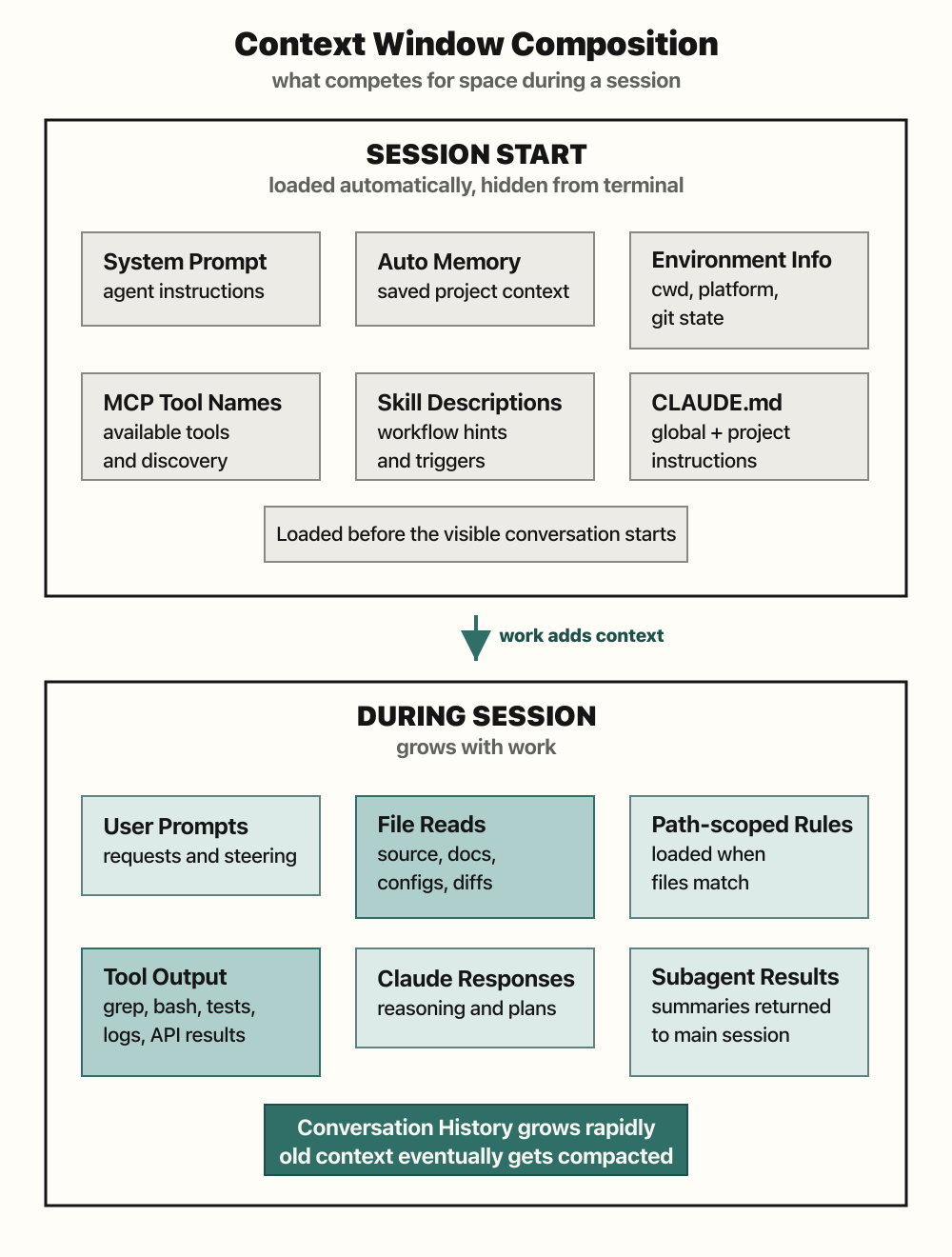
The context window is the model’s working memory for the current session. It contains the conversation, system instructions, loaded memory, tool schemas, file reads, command output, MCP responses, and any docs or tickets the agent pulled in. Every new piece of context competes with every other piece. An MCP schema, a long stack trace, and a design note all sit in the same budget.
Large windows helps, but they do not remove the need for curation. More context can mean better answers, but it also means slower turns, higher cost, more text for me to review, and more room for the model to miss facts: the needle-in-the-haystack problem. In practice, a 200K window can disappear quickly during a medium implementation, and a 1 million token window can still overflow during a longer design session.
Some rough token math is useful here. A 300-line code file with 8,000 characters is roughly 2,000 to 2,500 tokens, depending on the language and model. A 200K window could theoretically hold dozens of such files if it held nothing else, but real sessions also carry prompts, tool schemas, command output, responses, and history. If only half the window is realistically available for file content, the practical range gets much smaller. A 1 million token ceiling feels more workable, especially when the legacy codebase contains 5,000-line files. Even then, Claude Code usually does not read the whole file. It greps, slices around relevant terms, reads the first chunk, and decides whether to go deeper. It can still break, though. Sourcegraph MCP can fetch a raw file with a few thousand lines and overwhelm the context.
The habit that matters more is keeping durable state outside the chat. todo.md, systems/ files, memory, and skills give the agent a way to reload the current truth without replaying the whole conversation. Subagents are useful when I want a compact briefing instead of raw file dumps. CLI tools are useful when they can answer directly without adding a large tool schema. After compaction, I assume some nuance may be gone and ask the agent to re-read the external state before continuing.
Context management is not just “make the window bigger.” It is deciding what deserves to be in the window right now, what should live in a file, and what should be re-read from source when accuracy matters.
Projects and Structure

I initially found Claude Code’s project terminology confusing. A “project” really is the working directory where you start the CLI. Claude scopes state around that directory and may create .claude/ there. That directory does not have to be a git repository, but implied by official docs.
The docs often assume the working directory is a checked-out repo and that shared Claude files can be committed with the code. That does not match my setup. Our codebase has hundreds of microservices, many of them following shared templates and architectural grouping, so I usually start Claude one layer up. The Go parent folder and the separate .NET parent folder carry different saved permissions, memories, naming conventions, tools, and build constraints, but both would share global memory.
Shared rules stay at user level where they apply across both worlds, for example because both call into the same database. I also manage broad permissions at user level. That keeps the experience consistent and avoids re-allowing the same operations or re-saving the same memory rules in each working directory. The files Claude can use at project level are:
Project (current working directory)
| File | Purpose | Source control |
|---|---|---|
.claude/settings.json | Shared project settings: permissions, hooks, env vars for this working directory | Docs assume this can be checked into source control; in my setup it may live at parent-folder level instead |
.claude/settings.local.json | Local per-dev project settings: saved approvals/overrides for this working directory | No; Claude gitignores it when it creates the file |
.claude/rules/*.md | File/folder-specific instructions split out of CLAUDE.md | Project-scoped; commit/share only if the team should inherit them |
.claude/skills/{skill-name}/{skill-name}.md | Custom project skills/workflows | Docs describe project skills as shared via git; use ~/.claude/skills/ for personal skills |
.claude/CLAUDE.md or CLAUDE.md | Project instructions: build commands, conventions, code style, context that can’t be inferred from the code | Docs describe project instructions as shared via source control |
.mcp.json | Project MCP server definitions | Yes for project-scoped MCP; use local/user MCP scope for private servers |
Ignoring enterprise managed settings, precedence is: command-line overrides → local project (.claude/settings.local.json) → shared project (.claude/settings.json) → user (~/.claude/settings.json).
User (~/.claude/ and ~/.claude.json)
| File | Purpose |
|---|---|
~/.claude/settings.json | User global settings for all projects: permissions, hook definitions, env values |
~/.claude/CLAUDE.md | Global user memory/instructions loaded for all projects |
~/.claude/skills/ | User global skills |
~/.claude.json | Claude Code state file: OAuth session, user-scoped global MCP servers, local per-project MCP servers, project-keyed state |
~/.claude/projects/<project>/memory/ | Auto memory: Claude-written project memory with MEMORY.md as the index |
The confusing pair is ~/.claude/settings.json versus ~/.claude.json. The first is editable configuration: permissions, env values applied to Claude Code sessions and subprocesses, and permission hook definitions. Hooks are configured in JSON, but the handler can call a script wherever you keep it; there is no standalone hooks file for normal user/project config.
~/.claude.json is Claude’s private state file. It stores MCP registrations (--scope user for global MCP, --scope local for the current project) plus project-keyed choices such as allowed tools and trust. That state is per project, but it is not project settings.
Plugins are the packaging layer over all of this. A plugin is a separate directory with .claude-plugin/plugin.json; its components live at the plugin root, such as skills/, agents/, hooks/hooks.json, .mcp.json, bin/, and optional plugin settings. Standalone .claude/ files are better for quick project or personal setup. Plugins make sense when the same extension should be versioned, reused across projects, or distributed to other people.
Overall, Claude Code gives you a flexible configuration system coupled to the filesystem.
Permission System
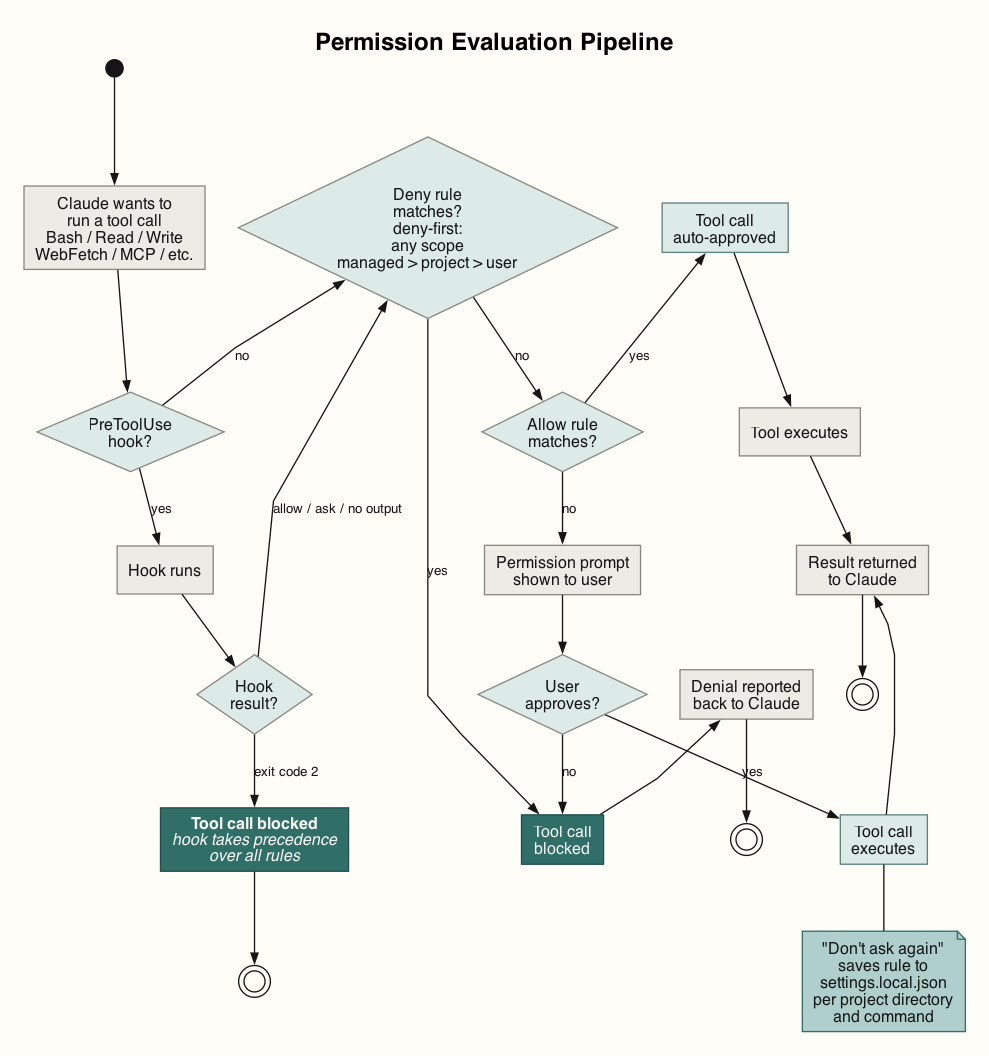
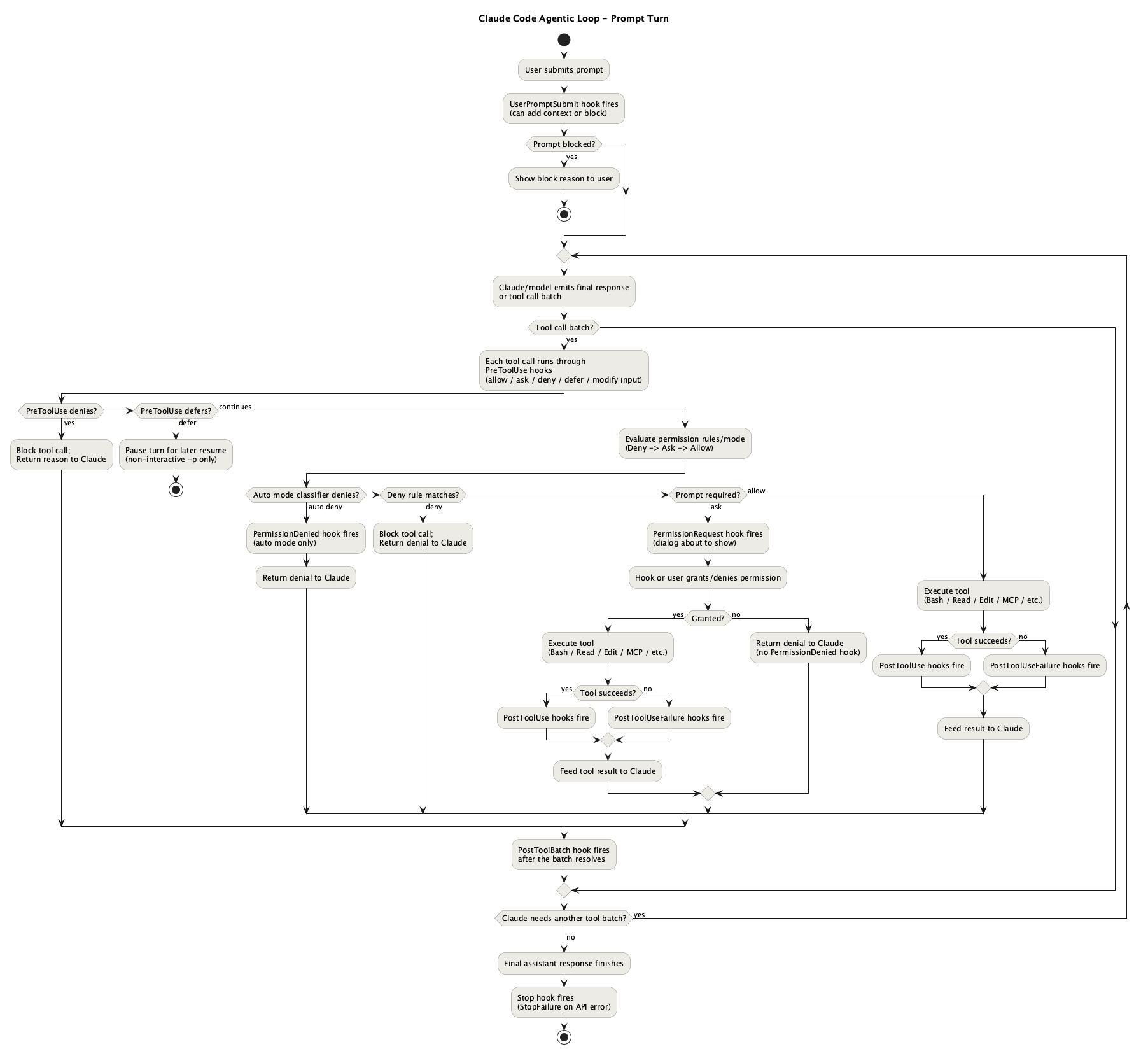
Claude Code checks every tool call against a permission rule before execution. Writes, Bash, and web fetches prompt unless an allow rule covers them. Reads can prompt too, and adding a blanket Read allow to user settings was one of the first things I did to support cross-service code examination. Rules live in settings files at project and user scope and follow a deny-first precedence across managed → project → user scopes. Full reference in the permissions docs.
One current rough edge: compound shell commands. A rule permitting Bash(safe-cmd *) does not cover safe-cmd && other-safe-cmd — each subcommand is matched independently. Custom bash hook scripts can extend approvals for compound commands when each part is safe by itself.
Permissions reduce risk, but they also interrupt legitimate work. The interruption becomes more visible with subagents or parallel sessions. The opposite risk is worse: some actions affect shared state and are hard to unwind. Force-pushing a remote branch after squashed-rebase without a backup is the kind of action where I want the agent to ask first.
In practice, modern models can work well with auto mode or broad allowances. Auto mode is the compromise between prompt fatigue and bypassing permissions entirely. Claude keeps working without prompting, but a separate classifier reviews non-trivial actions before they run. By default it trusts the working directory and, where present, the current repo’s remotes. Production deploys, force pushes, external exfiltration, IAM changes, and irreversible destruction are blocked unless the environment is configured.
In git projects, auto mode does not treat every push as dangerous. It can allow pushes to the current branch or a branch Claude created, but blocks force-pushes and direct pushes to main by default. It is useful for long routine tasks, but it is not a policy engine: durable boundaries still belong in deny rules, managed settings, and organisation-level controls. In our setup, direct pushes to main branches are already blocked, so what a developer cannot do, the agent cannot do either.
In my current setup every Bash call runs through a two-stage hook pipeline:
Claude wants to run Bash
    ↓
bash-deny.sh  — blocks: rm -rf, git reset --hard...
    ↓ (if not blocked)
bash-allow.sh — auto-approves: safe commands and compound commands where each is safe by itself
    ↓ (if not auto-approved)
Permission prompt shown to user
Deny runs first, auto-approve second. Only genuinely unknown commands reach the user. The settings.local.json allow-list grows over time — each approval can be saved so it never prompts again — so routine prompts become less frequent as you go.
The balance I want from permissions is fewer routine prompts and stronger stops on actions that can damage shared state. Agentic workflows make many local mistakes cheap to reverse, but shared-state actions need a different boundary.
Skills

The skills I have written fall into two types: workflow skills that run a structured multi-agent pipeline, and guide skills that load domain context into the session.
I am trying to use AI across the whole SDLC, so the skill map follows the work rather than the tool: spec writing, story kickoff, implementation in Go/.NET/SQL, UAT environment data setup, QA, searching for valid test data, writing tests, review, deployment tickets, and Claude Code harness maintenance.
Some skills are multi-tool, multi-step workflows. Others are a disciplined way to load conventions before the model starts guessing. Where I still do a step by hand, that gap might become the next skill candidate or an update to memory.
I want to have a working skill set that behaves like a pipeline. A story can start with Jira and a spec, then move through branch setup, call-chain research, implementation, verification, review, and QA handover with the agent switching to the relevant skill at each step. The goal is not a fully autonomous agent; it is fewer context resets, less repeated instruction, and less hand management on each step.
But the bigger gaps in the pipeline are not just missing automation. Human judgement matters. If I do not understand the problem or the system well enough, I cannot reliably steer the agent or verify its output. At the same time, the agent can close that gap faster by tracing the codebase, reading logs, checking documentation, doing initial code peer reviews and showing the evidence it found.
I use the agent to investigate, but I do not let it turn uncertainty into assumptions. It should ask a focused question only after it has checked local evidence and can explain what remains ambiguous. Product questions still go to product, and unclear specs still go back to the technical analyst, but I do not want to disturb my teammates with hallucinated questions from an AI. That points to another risk of overusing AI: a developer can start delegating verification of AI output to colleagues, which increases cognitive load for others, especially more senior engineers. The obvious bad version is generating code and opening a merge request without doing self-review first.
Skills vs Scripts
I often hear an argument on why we need to use unreliable AI if we already have scripts and bash and python and all this great technology. I think that is a valid argument. Here is how it evolved for me.
What is the difference between a skill and a script? Take one example. Say I have three services with one orchestrator and two dependencies. Each has changes related to my epic and different story branches. The changes are still in flight and not deployed, so I cannot test them in the environment, but I can run them locally. I start Claude Code and walk it through how to run the system locally, pointing at README.md and going through the motions until it succeeds. Now I have a working workflow and session knowledge for this setup, so I capture it as a skill. I end up with /service-local, where I can pass the services and branches I want.
Then I think: maybe this is not reliable enough and should be a script. I ask Claude Code to write the script from the skill. The script works, but it is clunky to use and does not cover all my use cases. So I move one step further and build a small TUI in Go over multiple sessions. That takes more time to build and maintain than simply supplying the skill and steering the agent with a few corrections. In this kind of workflow I have too many edge cases and variants, so the skill stays more flexible than the script. Eventylly I have droped my TUI app and just use the skill.
That said, there are caveats. This example is about experimenting and building a helper for my own work while I stay in the loop and observe the results. There is definitely a strong argument for using scripts when the workflow should be robust or black-box. In the end both things work well combined - flexible AI intelligence combined with stiff guardrails of the code.
Memory: Teaching AI Your Standards
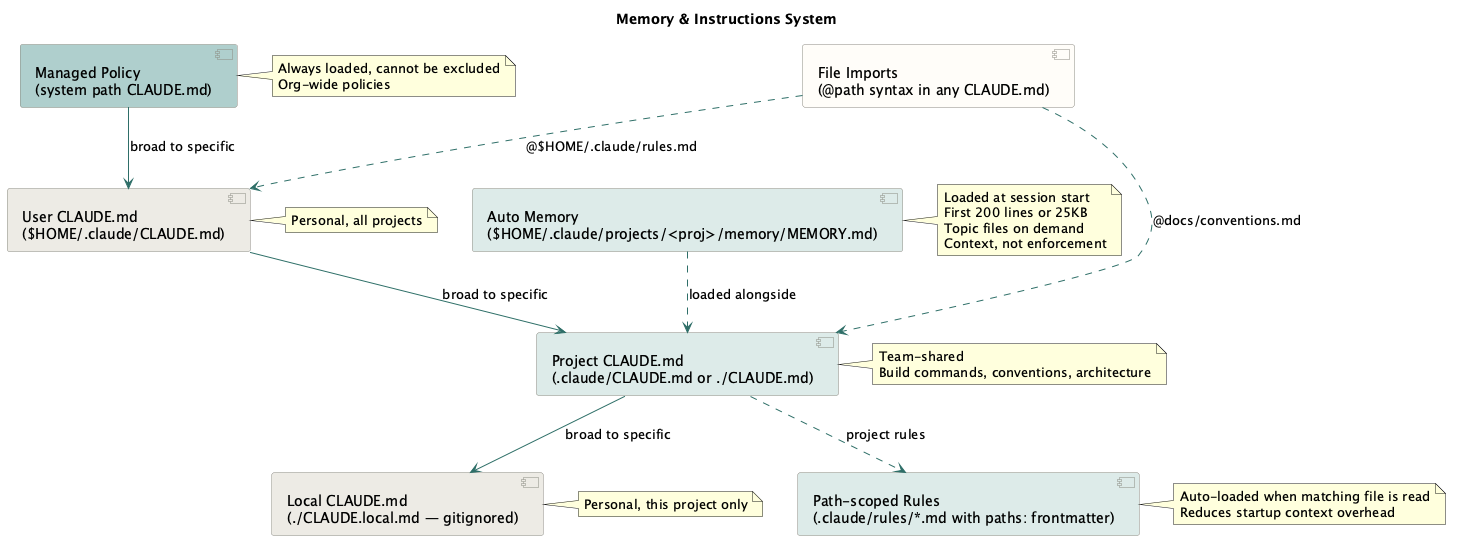
Claude Code sessions are stateless. Each session starts with a fresh context window, so the model does not automatically retain yesterday’s corrections, environment facts, or project state. I give it continuity through files on disk.
~/.claude/CLAUDE.mdis the global memory. I normally manage it by hand. It holds global rules I want in every project: environment facts, hard prohibitions, architecture rules, and my writing style.- Auto memory is the Claude-written layer. In each session I explicitly prompt it to “remember to do x, don’t do y”, which captures corrections and durable discoveries in
~/.claude/projects/<project>/memory/. In a sense it also becomes my own notepad, holding guides and workflow rules. After long sessions I can ask it to propose memory updates based on the mistakes I corrected. Recently I started drilling into why the mistake happened and trying to patch that pattern. That reduces some friction, but there are still limits to how reliably the model follows all of these instructions.
Memory is context, not enforcement. Claude mostly follows clear memory rules, but a rule like “never write to the shared UAT database” also belongs in permissions, hooks, or database access control. It is great when the model does not even try to do something silly, because that saves time and tokens, but stronger protection should exist at the permission level or, better, the organisational level. For example, we do not allow pushes to main branch by default. Full reference in the memory docs.
In practice, my setup has three locations: one global user file, one auto-memory project for the Go service tree, and one auto-memory project for the .NET back-office tree.
~/.claude/
├── CLAUDE.md                         ← hand-written global rules
└── projects/
    ├── <go-service-tree>/memory/
    │   ├── MEMORY.md                 ← index loaded at startup
    │   ├── feedback_no_confab.md     ← one correction
    │   ├── reference_db_flow.md      ← one stable fact
    │   └── ...
    └── <dotnet-backoffice-tree>/memory/
        ├── MEMORY.md
        ├── feedback_no_auto_push.md
        ├── reference_deploy_flow.md
        └── ...
The official docs describe auto memory as scoped per git repository. That detail matters in my setup because that is not how I use it. I launch Claude from a parent folder that contains many microservice repositories. One project can then carry shared conventions across the whole service tree instead of fragmenting into one project per repo.
Only part of auto memory loads at startup: the first 200 lines of MEMORY.md, or the first 25KB, whichever comes first. MEMORY.md acts as the index. Topic files beside it are not all loaded immediately; Claude reads them later with normal file tools when the index or the task points there. When the interface says “Recalled memory,” Claude is actively reading from the auto-memory directory. Docs: Auto-Memory
Auto-memory files are managed by Claude Code and use the following structure:
namedescriptionmetadata.type
Each file has a type-prefix:
feedback— corrections and confirmed working methods. This is most of my project memory.reference— stable lookup facts, such as the steps for a release flow or a known-good UAT account shape.project— state of work in flight that the repo does not record.
The Go project memory has accumulated 35+ feedback files. Some are tiny preferences, like not suggesting specific tools, because they simply are not installed. Others encode stronger working rules: use repository names for services, do not invent abbreviations, provide filepath:line evidence for every code claim, and read the code to verify before flagging an issue.
Two rule examples matter a lot. First, “verify before flagging”: if Claude finds a file that may have an issue, it should read the file and decide, not hand me a vague “worth checking” note. Second, “do not echo the user’s reasoning back as confirmation”: if I say “maybe we do not need that backfill script,” Claude should test the idea against code and data before agreeing. In one session that habit caught a real bug: a proposed backfill would have set a flag incorrectly for affected customers. Claude surfaced it because it checked the implementation and data across multiple sources quickly instead of just politely agreeing.
Freshness matters. Behavioral preferences age slowly; code observations age quickly. “Do not use python” may remain useful for months. “This method calls X” can become stale after one refactor. For code claims, I prefer memory to store navigation strategy and verification rules, not frozen line-level facts that the agent can re-read from the repo. That is why the approach of indexing the codebase into CLAUDE.md usually does not work for me. It mostly introduces duplication that goes stale quickly.
Memory maintenance becomes a thing. I keep a few rules for it:
- Dedupe before writing a new memory.
- Delete memories that turn out wrong or stale.
- Do not memorize what the repo already records.
- Keep hard guardrails in user’s
CLAUDE.md, permissions, hooks, or platform controls. - Keep user’s
MEMORY.mdlean so the startup index stays useful.
/memory is the audit path. It lists loaded CLAUDE.md, CLAUDE.local.md, and rules files, lets me toggle auto memory, and opens the auto-memory folder so I can prune stale or oversized entries.
The payoff is quiet but real. feedback_* files stop the same mistakes from repeating, while reference_* and project_* files front-load context that is expensive to reconstruct and cheap to store. Every correction captured once is one less correction in the next session.
Subagents: can you trust them?
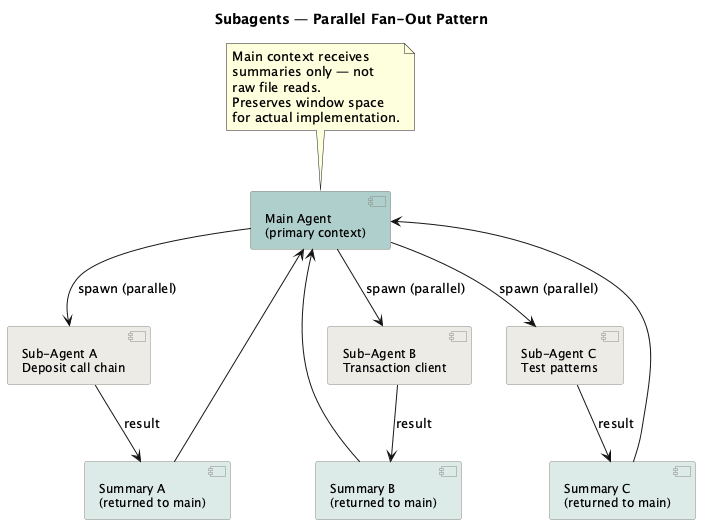
Subagents work well when I want to save context window in the main thread and keep bounded exploration elsewhere. The trick is to give them specific files and specific questions rather than open-ended tasks.
Claude Code treats a subagent as a separate agent context that the main session can delegate to. The official docs describe subagents as Markdown-defined agents with YAML frontmatter: name, description, model, tools, permission mode, skills, hooks, memory, and turn limits. The body of the file becomes the subagent’s system prompt.
A subagent starts in the main session’s current working directory, but it does not get the full main Claude Code system prompt or the whole conversation history. It runs its own tool loop, keeps intermediate reads and tool output inside its own context, then returns a final summary to the parent session.
This saves tokens because the main thread gets the result, not every file read along the way. It also creates the main risk: the subagent does not automatically carry the main session’s working memory, recent corrections, or local reasoning. Unless the parent prompt passes that context in, or the subagent has it configured, it is more likely to fill gaps with assumptions or return findings that still need verification. Docs: subagents, feature overview.
Subagents can lose context because they only know what the parent prompt passes in. I cannot easily watch and correct the full subagent conversation while it runs. Vague “be an expert reviewer” prompts do less than tight task prompts. One approach is to treat subagents like functions, not people. Give the input, define the output, require file:line evidence, and ask for a “not verified” list. Instead of reading all relevant files in the main session, I can ask subagents to handle bounded exploration: the call chain, transaction-query client contracts, or existing test patterns. The main context gets a compact briefing, which preserves room for implementation. The cost is handoff risk. A summary can hide uncertainty, and the main agent can treat a weak finding as stronger than it is. That happens often enough to need an explicit verification step.
What I am not reaching for yet is swarms. In my environment, fully unsupervised swarms would probably create more correction overhead than they save. I can give the agent more autonomy only when the domain is encoded in memory files, skills, and spec folders. The more that is written down, the less the agent has to assume. The gaps still remain: the model might still fail to follow one of the auto-memory files, for example.
My Observations of the process
A Four-Week Case Study On Design Work
Dozens of sessions. 5,000+ user turns. Many millions of tokens.
The generic requirement was to remove one payment method for specific customers, with specific exceptions, across many services, multiple DB migrations, the payment-method type system, and back-office account tooling. Claude could search repos, draft comparison tables, and surface contradictions quickly, but each claim still had to be checked against code, SQL, and data evidence. The loop became: read, verify, correct the spec, then read again.
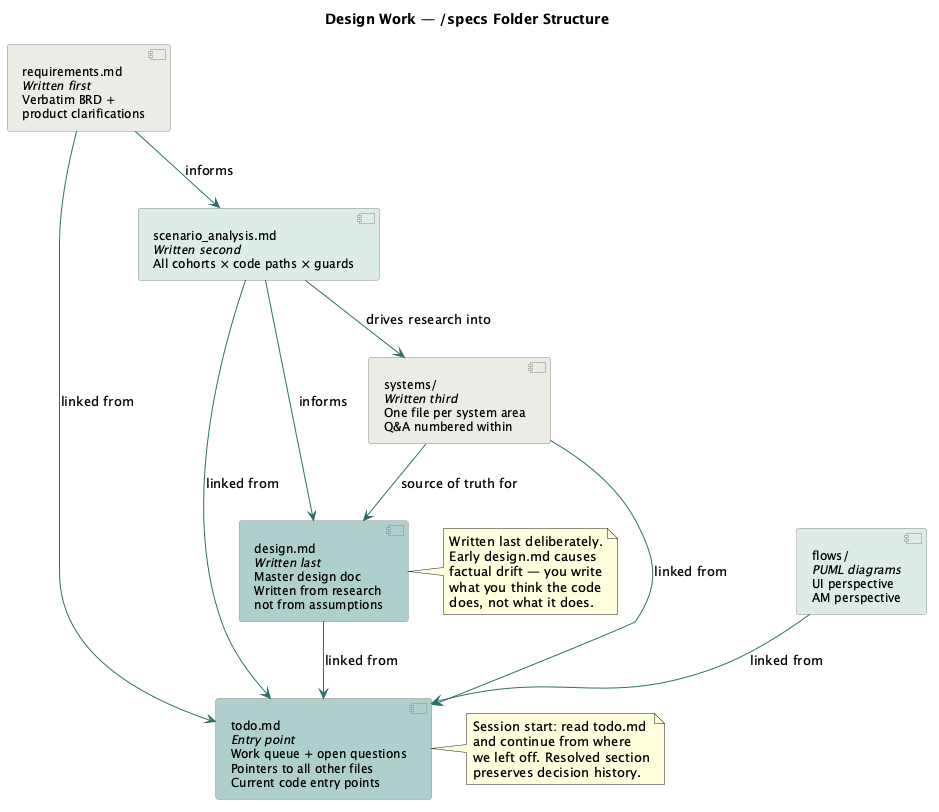
Here is the example of the knowledge base structure. This simple structure grew organically out of this project. It became personally a useful standard for multi-service design investigations. More complicated frameworks do this with agent swarms, but I mostly need something simpler: a way to manage a huge volume of context and build a knowledge base across sessions and agents.
specs/<epic>/
├── todo.md              ← Entry point. Work queue + open question tracker.
├── design.md            ← Final design doc. Written LAST.
├── requirements.md      ← Verbatim requirements + product clarifications.
├── test.md              ← Test data and selected cases.
├── systems/             ← Q&A research. One file per system area.
│   ├── first_deposit.md
│   ├── withdrawal_call_chain.md
│   └── balance_fields.md
└── flows/               ← PUML diagrams for deposits and withdrawal flows
todo.md is the anchor file. It has four sections: Index (links to every doc in the folder), Current Starting Points (specific code file paths that are the ground truth right now), Open Questions by category (product/implementation/.NET/waiting), and Resolved Questions with evidence and dates. Initial questions are based on what is in the requirements.md. I write section headers and question stubs first and then let Claude fill in verified content inside that frame. Those headers and questions limit where Claude can drift. The questions also helped me frame the problem better.
The Resolved section shows the history of decisions, the evidence, and if I have confirmed its correct.
The systems/ pattern: one file per system area, with tags to questions numbered within (Q1, Q9, Q11), referenced from todo.md and design.md. Instead of asking Claude to re-explore a system area mid-session, link to the file: “reparenting mechanics are in systems/reparenting_mechanics.md.”
The design.md document: the final design doc from which the Jira tickets are created. It outlines the general approach across multiple systems. I had initially AI draft it through discovery sessions and then edit it by hand. The editing was substantial because the model kept drifting away from facts. At times I seriously questioned whether AI was saving any time here or whether it would have been faster to write the doc by hand.
The agent added more work for me: structural edits, duplication removal, factual corrections (“this call chain is not correct, update all references and logic”), noise removal, invented-term corrections, abbreviation fixes, style fixes, and assumption fixes. Every correction slowed the process and increased token burn.
Assumptions, Requirements, Source of Truth
One default AI-agent behavior that I have noticed is to turn missing context into assumptions or into some version of “yes, that’s totally fine, carry on.”
Persistent memory rules helped me override Claude’s default behavior with something like “do not assume, use code or Confluence docs to verify.” It is simple and obvious to me, but not really to the model. It loads every session, and it works more often than I expected. It nudges the model from “state the assumption confidently” toward “verify, then state.”
Assumptions still creep in over long sessions. During the four-week design work, Claude would sometimes drift toward confident statements about code behavior that needed correction once the actual code was read by me or by the agent itself. I started using a dedicated /specs folder as a source of truth for findings, and that helped in long-running investigations. The systems/ files capture verified answers, so the model does not have to re-derive them from scratch each session. The more verified ground truth lives in the folder, the smaller the assumption surface gets. todo.md tracks Q&A on the system, and its answered section does the same job: hard-won decisions stay documented with their evidence so settled questions do not get reopened. It is a mini ADR.
It is also useful to get the agent to challenge my assumptions:
“I think we should do hard delete in the removal table and in the UPM, try to prove me wrong.” This prompt gives Claude a specific verification task: look for evidence that contradicts my decision. I still own the decision. Claude checks code, documentation, logs, or data and reports what it found. It is still a bit of a dice roll, but it can surface unexpected issues around the change.
Additionally, mechanical proof matters when writing code. Pre-commit hooks run the full test suite with the race detector and linters locally as well as in CI. If a hook fails, the commit does not happen, and the model has to investigate. That gives me evidence, not just the model’s word that everything is fine.
Where the Agent Breaks
The weak points mostly show up when the agent has too much freedom, too little evidence, or too little visibility into its own progress. It often self-corrects when pointed at a particular code file or doc.
Context compaction loses the thread. When a long session fills the window, /compact summarises it and carries on, but the summary is not lossless. After a compaction, the agent may re-ask something settled 400 lines earlier, drop an assumption, or reintroduce a term I already tried to get rid of. The “wait, we already covered this” moment is common.
The fix is to externalise live state into todo.md, design notes, or memory so it survives the summary. In my experience compaction happens quite often, overflowing a 1 million token window is not hard during design work or nasty bugs. A 200K window can go through multiple compactions even on a medium implementation task.
It loops between code and test. When a test fails, the agent can fall into a rut: patch the code, rerun the test, fail again, and patch the same area another way. Without close supervision, it can circle the same few edits instead of stepping back to question the broader fixture or the assumption underneath it. Better models behave better at this.
The same shape appears in design work when the agent revisits the same flow again and again. Not all cognitive load can be delegated; some problems still need a human to work through them and steer the agent.
It mis-scopes work. If the prompt says “improve this” or “review this” without a boundary, the agent may turn a local fix into an audit, a refactor, or a new architecture pass. For big vague work, the same problem shows up inverted: it may stay too shallow or avoid the design question that matters. I try to give it a maximum scope: files it may touch, files it must not touch, the exact output I want, and the definition of done.
It writes before it understands the repo. Large codebases have old implementations, duplicated code, generated code, shared templates, stale code, particular environment configs, baked-in assumptions, and feature-specific overrides. The agent can start working on the first plausible-looking file instead of taking the wider view, or it can go too wide and veer into deeper infrastructure than the task requires. Before implementation, it should trace the entry point, list the files it plans to change, and explain why those files are in scope.
Subagents can go dark. A subagent handed too much in one go can read many files, hit a limit, retry, or stall without a clear signal to the main thread. Parallel agents also make it harder to see which branch of the work is burning tokens or following a bad assumption. Smaller, single-purpose subagent calls with structured results avoid that failure mode.
The agent sometimes ignores memory. Sometimes the agent just does not use memory that is already in context and decides to do something else. First-principles-wise that is not surprising because it is still a statistical model, but in practice it feels like the dice rolled the wrong way.
Do I Actually Save Time?

The answer, as always, is “it depends.” Yes, I save time when the scope is well defined, and less so when there is a lot to design from scratch. Modern development has a lot of overhead: Jira management, complex release processes, maintenance, version control, inconsistent environments, flaky tests, complex workflows, and the cognitive overhead of navigating multiple services, database tables, procedures, and libraries while comparing them to requirements. The agent starts paying off here after the initial time invested in curating it to my processes.
Task types fall on a spectrum. At one end, work is a clear, repeatable win:
- Ritual work — branch creation, MR setup, timesheet logging, deploy ticket creation. Always mechanical, now automated. This saves time directly. Some of it could also be solved with Bash scripts, including scripts written once by the agent and reused later.
- Ad hoc draft work and one-off scripts — one big win is work that does not need to be production-grade: querying a database, testing performance, checking a hypothesis, or producing a disposable report. If I have an idea and want to test it, Claude can write a script, run it, produce the output, and let me ask follow-up questions in the same interface. I still read the result, but the whole loop can take minutes instead of hours. That feels powerful.
- Cross-repo search — finding every caller across 198 repos used to mean manual Sourcegraph passes; now it can be a single prompt. The agent does not get bored on the 40th file, and it can move across Go, .NET, and SQL. It can still miss obvious points, which is why the harness and verification loop matter.
- Data digging — schema discovery, table linking, multiple queries to land on a valid test user from db. Tedious by hand, and exactly the kind of query generation it’s good at.
The middle category is first-draft work. The agent gets to a draft quickly, but verification and correction can consume the time it saved:
- First-draft code and specs. It gets you 80% of the way quickly, but in a brownfield system with settled conventions the last 20% carries the real cost. The 542-exchange design doc was “written” in an afternoon and finished a week later. It might have been faster by hand.
At the far end, work where it can actually cost you time if you’re not careful:
- Anything you accept without reading. A confident-but-wrong call chain that you take at face value doesn’t just waste the minute it took to generate — it can send a whole exploration down the wrong path for hours or longer.
Faster Does Not Mean Hands-Off
“Did it save time?” mixes two measurements:
- Have I done this task faster?
- Could I work on something else while the agent was running, or did I need to keep watching?
Agents usually improve the first. They search, compare, and draft faster than I can. They do not always improve the second. If I need to correct drift every few turns, the task may finish sooner, but I still spend the day watching it. My throughput is still limited by one thing at a time, and context switching between parallel tasks still burns me out quickly. So what do I do while the agent is running? Mostly I read the code, specs, docs, and tests so I understand the change and its surroundings well enough to review the agent’s output and judge the wider impact and risk.
Some effort relocates rather than disappears:
- Verifying agentic output. Every factual claim about the code is worth checking. The model can get call chains wrong, invent terms, or place logic in the wrong file. In the removal project, the read-verify-correct cycle was the single biggest time cost over the four weeks — it didn’t remove the hard part of the work, it changed its shape.
- Knowledge you did not build yourself. If Claude reads a subsystem and you do not, you do not yet know that subsystem. You cannot reliably steer the agent or verify its work unless you stay in the driver’s seat. I can delegate code writing, but I still need to understand the system, and understanding takes time and effort.
- Agent knowledge curation. Spotting a pattern, writing the rule, updating memory, changing configuration, writing new skills, and curating shared conventions all take time. The payoff comes later.
- Reading. Agentic work still creates a lot of reading. Reading chat output all day adds its own cognitive load because every answer raises the same question: what can I trust, and what needs evidence?
That difference showed up in my own work. I could delegate mechanical tasks: branch setup, cross-repo search, timesheet updates, and SQL investigation where mistakes were easy to spot. I stayed close to design and migration work because wrong claims there could change the plan. I read each claim against the code before trusting it. Steering pays off over time: the agent starts following rules such as “do not assume”, “verify in code or docs”, and “ask before making a design choice.” Inside a session it can adjust to direct corrections.
The tiring sessions were mostly just long, and they were the ones where I had to keep pulling the agent back to the facts and re-reading the same points repeatedly. The task maybe finished sooner, but I still spent the day reading, checking, and correcting. On some design work I think I would have been faster by myself, but at the time I had not curated the model well enough for those workflows.
The first time through a subsystem is slow: the agent does not know your terminology, style, or process rules, and you correct all of it. The second time is much faster if those corrections went somewhere durable. That is the point of memory files, /specs folders, and skills: they turn this session’s corrections into next session’s defaults.
In my use, the correction overhead on naming, style, and process dropped close to zero once I captured it. The sessions where I skipped that capture kept paying the same tax again. On a well-scoped implementation story, that made the agent a clear win. On an open-ended design investigation, the benefit came later, after I understood the system well enough to steer confidently.
Across the Whole SDLC
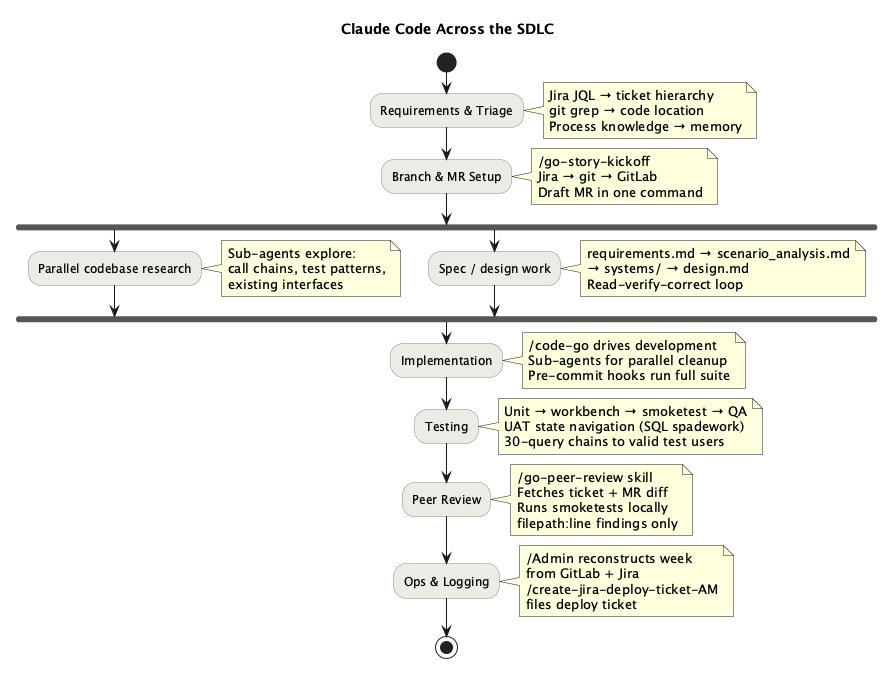
It is easy to think of a coding assistant as a tool for the “write the code” step. In practice, writing code is often the easiest part. The larger win is across the handoffs around code: understanding the ticket, finding the right spec, locating the relevant services, setting up a branch, reconstructing local context, verifying behavior, and packaging the change for other systems and teams. In a brownfield codebase, that surrounding work often dominates the elapsed time.
The skill catalogue changed how I use the agent across those phases. Some skills are workflow skills: they run a structured sequence, fetch the right context, and leave me with artifacts I can inspect. Others are guide skills: they preload conventions, architecture rules, and team-specific process knowledge before any actions are taken. That split matters because most SDLC friction is not in generating code. It is in understanding enough of the system to make the next step correctly.
That changes the human role. The agent introduces a middle layer. I am not delegating the whole lifecycle to the model. I am using it to compress setup, search, and verification work so I can spend more attention on judgment: whether the spec makes sense, whether the design fits the system, and whether the change is actually safe to ship.
Configuration
Self-regulating the dev environment is another place where the agent shines. In my case that means VS Code setup, creating debug configs on the fly, running services, and updating my Vim plugin config. VS Code is surprisingly customizable with AI in the loop. What used to mean clunky editing of random fields and hunting through docs for obscure settings now becomes a much smoother workflow. The same applies more broadly to setting up configs, environments, and apps. One next step I want to try is writing my own VS Code plugins. If onboarding documentation is well written, and maybe kept up to date by another agent, setting up a new machine should be quick. The remaining time then goes into the new developer learning the tools, which can also be accelerated through Q&A with the agent.
Requirements and Design
I have defined the skill /spec-writing that loads the local conventions that matter for this codebase: how we shape functional specs, how we document flows, what ticket structure the team expects, and which architecture and database patterns are normal here. That saves a lot of dead time before real design starts, where you are half reading old docs and half reverse-engineering what “good” looks like from previous tickets.
The non-obvious part here is process knowledge, not code. Which ticket type QA actually works from, which fields a handover needs filled in, who signs off what, you cannot derive that from reading a file. It comes up in conversation, goes into memory, and after that Claude fills in the right ticket fields without being reminded through the Jira MCP. That is the kind of thing that makes the second epic faster than the first.
Implementation — Go
For each story ticket I run /go-story-kickoff to set up the branch and draft MR. /code-go then drives the implementation, then I run /go-qa for self-review. I keep myself in the loop on each stage.
/code-go loads the local Go rules: architecture patterns, layer boundaries, naming conventions, code style guide, how to work from the spec and other details. In a large codebase those constraints matter a lot, and the raw code writing is the easy part. The hard part is placing the change in the right layer, with the right dependencies, and in a way that matches how the rest of the service is already shaped.
The pre-commit hook then runs the linter and unit test suite with the race detector before the commit lands. That works as a mechanical gate for an agent. That is the main implementation pattern for me: let the model move quickly, but force it through local conventions and deterministic checks.
Testing
When the agent has a good spec and a few test examples from the codebase, it is strong at testing work. It can write unit tests, run the suite, inspect failures, find relevant UAT data, and explain the evidence. /go-unit-test carries the local test patterns. Mostly it lets the agent generate tests around the specific mock system already used in the repo.
The broader QA skills connect the layers of testing. /go-qa encodes the test pyramid from unit through workbench and smoketest to QA handover. /uat-smoketest and /verify push the agent toward observed behaviour, not just green local output. /find-user and /create-user matter for the same reason: a lot of UAT time disappears into finding data that actually exercises the path you care about.
The agent can treat a failed test as a reason to patch code immediately, rerun the suite, fail again, and repeat until it spins in a loop of doom. Tests, code, and spec can all drift, so the first question is which one is wrong. The better use is to make it inspect the failure as evidence. Is the fixture wrong? Is the environment wrong? Is the expectation wrong? Is the spec ambiguous? TDD works well here because a concrete failing test gives the agent a bounded target. If the spec is vague, the test often becomes the clearest statement of intent available.
Code Review
I defined a custom skill, /go-qa, that fetches the ticket and MR diff, switches to the branch, reads the specs and code, checks the logic and tests, finds real UAT users, runs the test locally against the environment, and reports findings as filepath:line. I still read the actual spec and code myself. That overlap gives me parallel review: while the agent does a structured first pass, I use the same time to build my own understanding of the change. Two different review passes happen at once, so I cover more ground before I approve anything.
The more general review skills reinforce the same pattern. /go-peer-review is useful because it does not stop at the diff. It fetches the ticket, checks the branch, prepares test data, starts services locally, runs smoketests, and then reports findings without posting them directly.
Because we usually have a verified spec before any code exists, review is less “does this look right” and more “does this match what we agreed.” The agent can diff the implementation against the spec and flag where they diverge. That only works because the spec was already checked during design.
AI review needs mechanical gates around it: linters, tests, local environment checks, and filepath:line evidence. It also needs limits on irreversible shared-state actions. Findings are cheap to inspect; bad MR comments are not. In a number of reviews the agent has found subtle issues I had missed, but the trust comes from the workflow and the evidence, not from the model sounding confident.
Legacy .NET Work
The .NET side is a good example of where the agent becomes useful for version, dependency, build-constraint, and deployment-overhead management that is easy to forget if you do not live in that stack every day. Memory rules and skills like /code-dotnet, /net, and /net-deploy matter because they preload that operational context. Once the agent learned all of this, it moved from a failure mode where every attempt was bluntly wrong to being an operational helper that does most of the heavy lifting.
These are not deep engineering problems, but they are the kind of procedural details that break momentum and send you back into docs, old tickets, or team chat. Another useful is /net-rebase: the rebase is not conceptually hard, but the dependency chain causes version propagations and conflicts across multiple repos so a structured guide is worth having.
I think deployment and back-office work as part of the SDLC gains. A lot of delivery time sits inside those brittle steps. If the agent can carry the workflow, remember the constraints, and keep the sequence straight, I spend less effort on ceremony and more on checking whether the release itself is actually correct.
SQL
SQL releases follow a long process through Jira and GitLab. A skill works well here because the work is structured, repetitive, and easy to verify against the release checklist. /code-sql loads the SQL style guide and examples. /sql covers the mechanics of exploring DB schema, building queries, and using the right execution patterns against the right databases. That is valuable because database work in a brownfield system has a lot of overhead. The /sql-release skill automates the paperwork side of the release, and because the fields and hierarchy are well defined, the output is easy to verify before anything moves forward.
Deterministic tooling
The better question is when to keep prompting the agent and when to turn the repeated step into a script. If the action is deterministic and repeated often, a small script usually wins. The agent can still write or maintain that script.
Cron jobs are another useful pattern. A cron can prompt the agent to check something and act only when a condition changes. I found this useful for curating documentation drift while working on code.
Brownfield work stays hard because the system is large. If you already know the system deeply, the agent can make existing workflows much faster. If you do not, the agent can accelerate the learning, but you still need to read, question, and steer. AI saves time when the work is scoped, the evidence is checked, and useful corrections become memory, skills, or specs. AI maintenance becomes one more engineering chore.
What is next?
Currently I am looking into loops and dispatch, so the agent can pick up new work, do implementation and a first-pass review, and prepare reports for me. Part of that is figuring out how to use subagents efficiently. Recently I switched to Opus 4.8, and yes, it is much better than previous models. When I go back to Sonnet 4.6 to save on costs, it feels different and sometimes hurts. The most expensive model wins, and that worries me a little. The dark version is a future where a few large players run the ultimate models at a scale that smaller businesses and individuals cannot match. The differentiator stops being skill and becomes who can afford the access. I hope falling per-token prices keep pushing against that, but the cost gap is real if one wants to run agents at scale. Back in everyday work, would be interesting to figure out how I can read less code or agents output more surgically. Reviewing code line-by-line is a bottleneck, but skipping the review entirely would be too risky: approving changes to a system I only understand through a summary. One idea around that is to have risk-weighing on the changes and impact blast radius. How far I can push that depends on how much I can trust the report the model produces. Practically I dont think we there yet. The next generation should be better, but it is worth being clear about where the progress is coming from. Almost all the recent gains are in agentic coding: scale, more data, and a better harness around the model. There are no new core algorithms. People like Yann LeCun are chasing different approaches like World Models, and that research is the real crux. For now we have LLMs, and even a very smart LLM — which today’s are not — still needs ground truth supplied to it. An LLM is a statistical system, so variance will always be there no matter how big the model is. Until a better algorithm arrives, hallucinations will persist, and the harness will be crucial in minimizing them.
Appendix: Background LLM Research Timeline
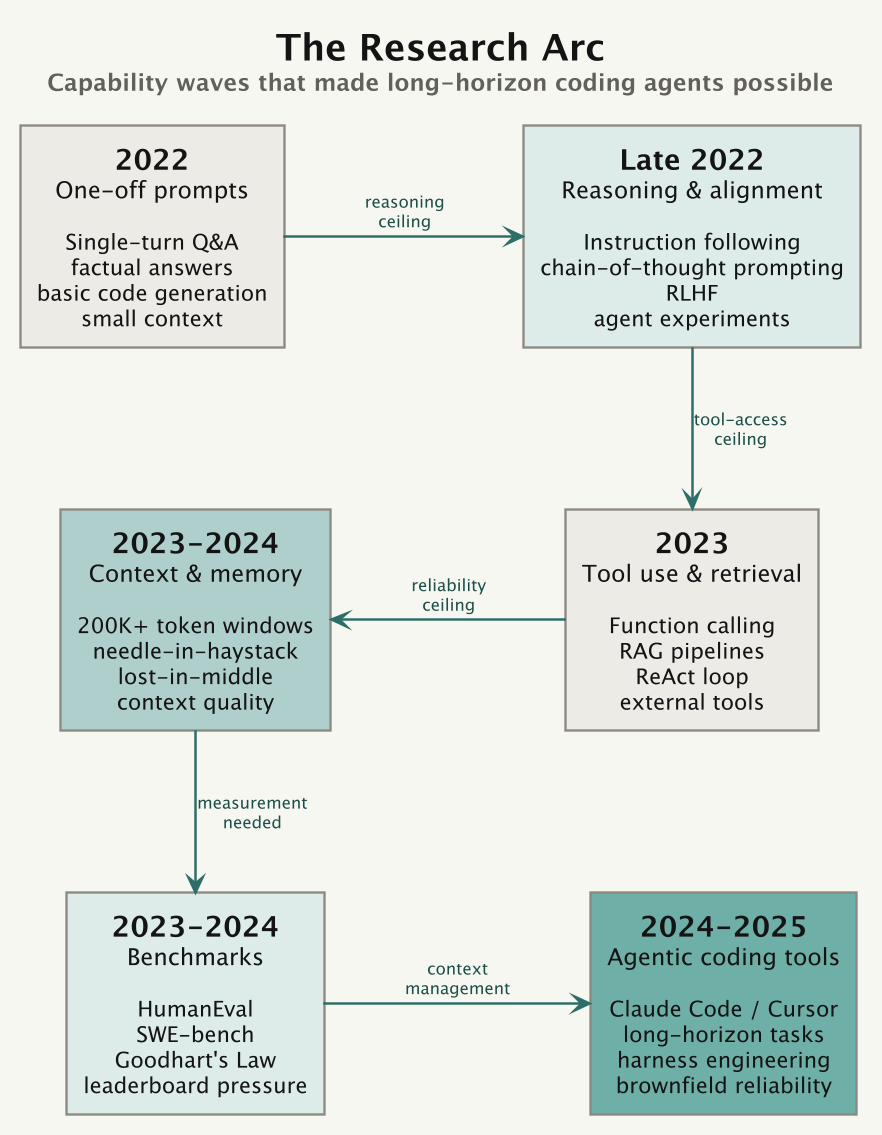
The agentic interface in Claude Code is recent. It grew out of a short sequence of capability breakthroughs: instruction following, tool use, longer context windows, and harnesses that can keep a model on task across many steps.
One-off prompts (2022). The first wave was single-turn Q&A. GPT-3.5 and Claude 1 could answer factual questions, summarise documents, and write basic code. You asked once; it answered. Small context windows kept sessions shallow.
Chain-of-thought and instruction following (late 2022). Research showed that prompting models to “think step by step” improved accuracy on multi-part problems. RLHF (reinforcement learning from human feedback) made models better at following user instructions. Together, those changes raised the practical ceiling. Latest and biggest models are much better at following instructions, jumps between Haiku 4.5 to Sonnet 4.6 to Opus 4.8 in quality are huge.
Tool use (2022–2023). MRKL (AI21 Labs, 2022) proposed routing between an LLM and discrete expert modules such as calculators or search engines. LangChain then spread the pattern to developers: chains, agents, tool wrappers, RAG pipelines, and memory stores, all wired around raw API calls and prompt engineering. OpenAI formalised tool use with structured function calling in June 2023. The model stopped being only a text generator and became a reasoning engine that could reach out.
Multi-step and the agentic arc (2023). ReAct (reason + act) formalised the plan–execute–observe loop. AutoGPT made autonomous multi-step execution visible to a wider audience. Reliability was poor because errors compound over many steps, but the paradigm was established. Tool calls, not just tokens, were now first-class outputs.
Context window and the haystack problem (2023–2024). Windows grew from 4K to 200K tokens and beyond. The question became whether models could use all that context, or mostly the beginning and end. The “lost in the middle” finding showed that models can miss facts buried inside long documents. Context size improved, but context retrieval quality became the harder problem.
Benchmarks (2023–2024). HumanEval measured single-function code generation. SWE-bench went further: fix a real GitHub issue end-to-end across a codebase. Completion rates climbed from single digits to over 50% in two years. The bottleneck shifted from “can the model reason?” to “can the harness keep it on track over many steps and tool calls?”
Benchmarks still need caution. They attract Goodhart’s Law, scaffolding tricks, memorisation, and evaluation-specific optimisation. A good score is encouraging, but it is not the same as reliable performance on your actual codebase.
Reasoning models and standard plumbing (2024–2025). The next gain came from letting models spend more compute before answering. OpenAI shipped o1 (preview September 2024, full release December 2024), then o3 and o3-mini in early 2025; DeepSeek R1 landed in January 2025 and showed the recipe could be reproduced cheaply. These models are trained to produce a long internal chain of thought, which helps most on hard multi-step problems where a single forward pass used to guess. In parallel the plumbing got standardised: Anthropic published the Model Context Protocol (November 2024) so tools, data, and context could be wired to a model through one interface instead of bespoke glue, and Claude 3.5 Sonnet’s computer use (October 2024) pushed tool calls past text and into clicking around a screen. Better reasoning raised the ceiling again, but it also made the harness the thing that decided whether that reasoning got used well.
Agentic coding harnesses (2025–2026). This is where the current generation lives. Claude Code arrived as a research preview in February 2025 with Claude 3.7 Sonnet, then went generally available in May 2025 alongside the Claude 4 models. The pattern spread fast: most labs shipped a coding CLI agent within the year. SWE-bench scores kept climbing as the harnesses improved, not just the models. The Claude 4.x line added the pieces that make long-running work practical: a one-million-token context window, an effort parameter to trade speed against depth, an explicit memory tool, and parallel subagents. By Opus 4.8 (May 2026) a single session can plan work, fan out hundreds of subagents, verify their output against the existing test suite, and report back, enough to carry a codebase-scale migration from kickoff to merge. The model stopped being the bottleneck. Trust did. The open question is no longer whether the agent can do the work, but whether you can verify it did the work correctly.
The other thing that happened by 2026 is that people started shopping around. Once the best models were also the most expensive, the cost and the single-vendor lock-in became hard to ignore, and a wave of model-agnostic harnesses showed up to answer it: terminal agents like OpenCode, Aider, Cline, and OpenHands that wrap the loop around whichever model you point them at, including cheaper or open-weight ones.
In summary each wave found the next constraint. Prompts hit the reasoning ceiling. Reasoning hit the tool-access ceiling. Tool access hit the reliability ceiling. Reliability hit the context-management ceiling. The current generation is working on improving harness as well as the model, but ultimatly trust and reliability becomes biggest issues.
Further Reading
- AI Engineer YouTube series — multitude of great talks
- Context Engineering
- Agent Skills — Addy Osmani on agent skills management
- Claude Code docs — memory system, hook configuration, workflow patterns
- Agent Harness Engineering
- Future of Engineering
- 2025: The year in LLMs — Simon Willison’s roundup of the year
- Claude 3.7 Sonnet and Claude Code — Anthropic
- Introducing Claude Opus 4.8 — Anthropic
- Anthropic Claude Model Release Timeline — hidekazu-konishi.com
- Model Context Protocol — the standard for wiring tools and context to models
- OpenCode — terminal agent, works with many model providers
- Aider — Git-native terminal coding agent
- Cline — VS Code agentic coding extension
- OpenHands — autonomous agent for delegated feature work
- Andrej Karpathy — coined “vibe coding”
- Simon Willison — sharp, frequent notes on what these models can and can’t do
- The Pragmatic Engineer — Gergely Orosz on how AI is changing the job