Technical blog
Using Claude Code Across the SDLC
How Claude Code skills map to SDLC phases in an enterprise codebase: configuration, specification writing, Go implementation, testing, review, .NET, SQL, and deterministic tooling. Part 4 of a series on working with Claude Code in a large brownfield enterprise codebase.
TL;DR: This walks through how I have set up Claude Code skills for configuration, specification writing, Go implementation, testing, code review, legacy .NET work, and SQL releases. It also explains how non-deterministic skills differ from deterministic scripts and how they work together. Here I will not give full skills definitios as they are fairly specific to my flow, but try to give an example that can help readers improve their workflows. The skill types (workflow vs guide) and how memory feeds them are covered in Part 2: Teaching Claude Code Your Standards.
Codebase and Team
For the last year, I have been using Claude Code in a large payments microservices environment: roughly 200 Go repositories plus a .NET legacy codebase for back-office apps, together adding up to a few million lines of code. The platform covers 64 payment providers and 175 payment methods across multiple regions, countries, and currencies. The database has thousands of tables, scripts, and stored procedures, again adding up to a few million lines of SQL.
The service layer is split between orchestrators, gateways, callbacks (Go), and back-office tools (.NET). The architecture is documented, but many details still live in code, data, the environment, or people’s heads. Work is spread across multiple teams, composed mostly of backend engineers, with a few frontend engineers, a tester, and a delivery manager. We split engineering work into three main categories: writing specs from business requirements, developing features from specs, and managing releases. So the person who writes the spec does not write the code, and the person who wrote the code does not release it. We also have peer review. The same logic goes through multiple pairs of eyes before it is merged into main. From an AI-agent perspective, the important part is that we often have a fairly good technical spec before any code is written, and that helps a lot.
My personal setup is Git Bash on Windows and VS Code. I have most of the repositories cloned locally. Our tools include Sourcegraph, which indexes the whole codebase and is useful for code search; Splunk for logs; Jira for tracking work; and sqlcmd for the quick test db access from the terminal.
Across all this, Claude Code streamlined workflows, but it also raised questions about knowledge curation, trust, hallucinations, cognitive load, and attention cost.
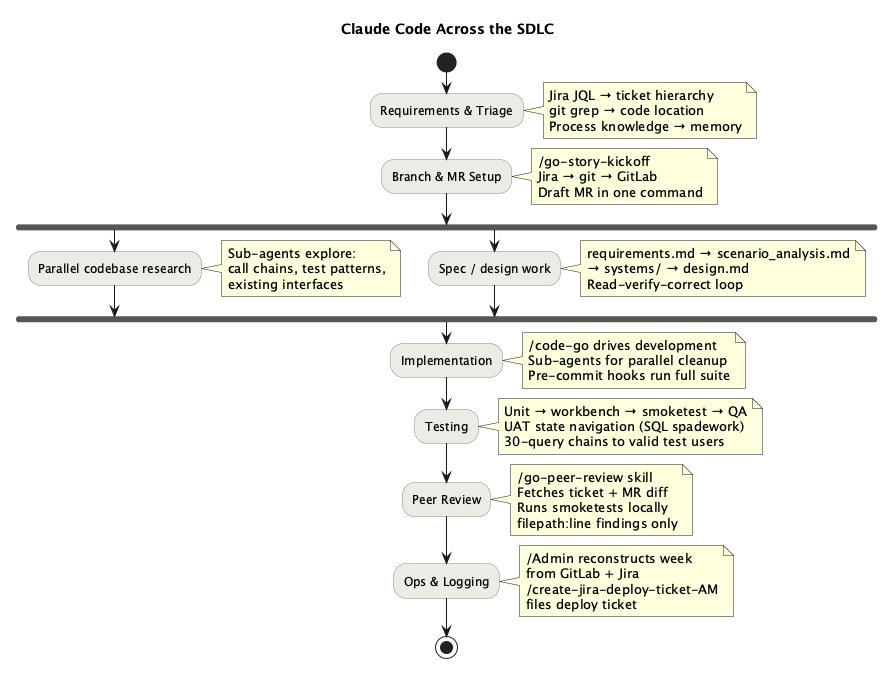
It is easy to think of a coding assistant as a tool for the “write the code” step. In practice, writing code is often the easiest part. The larger win is across the handoffs around code: understanding the ticket, finding the right spec, locating the relevant services, setting up a branch, reconstructing local context, verifying behaviour, and packaging the change for other systems and teams.
The skill catalogue changed how I use the agent across those phases. Some skills run structured workflows and fetch the right context. Others preload conventions, architecture rules, and team-specific process knowledge. That split matters because most SDLC friction is not in generating code. It is in understanding enough of the system to take the next step correctly.
That changes the human role. The agent introduces a middle layer. I am not delegating the whole lifecycle to the model. I am using it to compress setup, search, and verification work so I can spend more attention on judgment: whether the spec makes sense, whether the design fits the system, and whether the change is actually safe to ship.
Configuration
Configuring the development environment is another place where the agent shines. In my case, that means VS Code setup, creating debug configurations on the fly, running services, and updating my Vim plugin configuration. VS Code is surprisingly customisable with AI in the loop. What used to mean clunky edits to random fields and hunting through documentation for obscure settings now becomes a much smoother workflow. The same applies more broadly to setting up configurations, environments, and apps. Also it is fairly easy to write custom VS Code plugins just by prompting an agent with the spec. If onboarding documentation is well written and perhaps kept up to date by another agent, setting up a new machine should be quick. The remaining time then goes into the new developer learning the tools, which can also be accelerated through Q&A with the agent.
Requirements and Design
I have defined the skill /spec-writing, which loads the local conventions that matter for this codebase: how we shape functional specs, how we document flows, what ticket structure the team expects, and which architecture and database patterns are normal here. That saves a lot of dead time before real design starts, when you are half-reading old documentation and half reverse-engineering what “good” looks like from previous tickets.
The non-obvious part here is process knowledge, not code. You cannot derive process knowledge from reading a file: which ticket type QA actually works from, which fields a handover needs, or who signs off on what. It comes up in conversation, goes into memory, and after that Claude can fill in the right ticket fields through the Jira MCP without being reminded. That is the kind of thing that makes the second epic faster than the first.
An AI Agent as a Universal Interface into Multiple Systems
The first concrete value Claude Code brought to me was connecting several systems in one command. Workflows scattered across the terminal, IDE, and browser tabs can be joined through one prompt.
My /go-story-kickoff skill is a small example. It takes a single Jira URL and runs the branch-setup sequence on its own:
jiramcp get_issue→ ticket details, the parent epic, and the service it belongs to.ls orchestrators/ | grep service→ finds the repository locallygit fetch --all --prune,git branch -r | grep <epic>→ confirm the epic branch existsgit checkout -b <epic>-<story> --no-track origin/<epic>git push -u origin <epic>-<story>- Open a browser to a pre-filled GitLab MR creation URL targeting the right parent branch
After branch setup, parallel subagents read the spec and explore the call chain, dependency-client contracts, and existing patterns. The result is a ready-to-use branch, a draft MR, and a main session loaded with the context from the skill and memory. From there, I can reset the context and move into implementation, testing, handoff, or deployment.
Nobody likes filling in timesheets every week, so I made an agent to do it. It is routine copy-and-paste work that deserves automation. My /admin skill makes the task less miserable by running four data pulls in parallel:
get_Admin_worklogs (current week)       ─┐
get_Admin_worklogs (previous week)       │  fired simultaneously
get_gitlab_user_activity (git server one)        │
get_gitlab_user_activity (git server two) ─┘
call rss_feeder — a CLI tool created by the agent for the agent
The /admin skill checks the worklog format and recent codes through the Jira MCP. GitLab activity provides corroboration, while rss_feeder provides my Jira activity feed. I even vibe-coded rss_feeder specifically for this workflow to get better precision. It took only a few sessions to build. The model then proposes a timesheet table for me to review instead of making me reconstruct the week from browser tabs. It is not an impressive demo, but it is useful: it removes a small recurring tax.
Seen this way, Claude Code becomes a window into the systems around a developer: “find me a valid user in the DB for this flow”, “how does this subsystem integrate with accounting?”, or “show me the dependency graph for tickets in this epic from Jira”. The bottleneck becomes inference speed and trust. Fast models can make this feel natural. With slower models, it can be quicker to open the browser tab and read the material yourself. Trust comes from strong guardrails in the skill and from my own knowledge of how the workflow should proceed.
Implementation — Go
For each story ticket, I run /go-story-kickoff to set up the branch and draft an MR. /code-go then drives the implementation, and I run /go-qa for self-review. I keep myself in the loop at each stage.
/code-go loads the local Go rules: architecture patterns, layer boundaries, naming conventions, the code-style guide, how to work from the spec, and other details. In a large codebase, those constraints matter a lot, and writing the code is the easy part. The hard part is placing the change in the right layer, with the right dependencies, and in a way that matches how the rest of the service is already shaped.
The pre-commit hook then runs the linter and unit test suite with the race detector before the commit lands. That works as a mechanical gate for an agent. That is the main implementation pattern for me: let the model move quickly, but force it through local conventions and deterministic checks.
Testing
When the agent has a good spec and a few test examples from the codebase, it can handle much of the testing work well. It can write unit tests, run the suite, inspect failures, find relevant UAT data, and explain the evidence. /go-unit-test carries the local test patterns. The skill mainly lets the agent generate tests around the specific mock system already used in the repo.
The broader QA skills connect the layers of testing. /go-qa encodes the test pyramid from unit tests through workbench and smoke tests to QA handover. /uat-smoketest and /verify push the agent towards observed behaviour, not just green local output. /find-user and /create-user help with the same problem: a lot of UAT time disappears into finding data that actually exercises the path you care about.
The agent can treat a failed test as a reason to patch code immediately, rerun the suite, fail again, and repeat until it spins in a loop of doom. Tests, code, and the spec can all drift, so the first question is which one is wrong. A better approach is to make it inspect the failure as evidence. Is the fixture wrong? Is the environment wrong? Is the expectation wrong? Is the spec ambiguous? TDD works well here because a concrete failing test gives the agent a bounded target. If the spec is vague, the test often becomes the clearest statement of intent available.
Code Review
I defined a custom skill, /go-qa. It fetches the ticket and MR diff, switches to the branch, reads the specs and code, checks the logic and tests, finds real UAT users, runs tests locally against the environment, and reports findings as filepath:line. I still read the actual spec and code myself. That overlap gives me parallel review: while the agent does a structured first pass, I use the same time to build my own understanding of the change. Two different review passes happen at once, so I cover more ground before I approve anything.
The more general review skills reinforce the same pattern. /go-peer-review is useful because it does not stop at the diff. It fetches the ticket, checks the branch, prepares test data, starts services locally, runs smoke tests, and then reports findings without posting them directly.
Because we usually have a verified spec before any code exists, review is less “does this look right” and more “does this match what we agreed?” The agent can diff the implementation against the spec and flag where they diverge. That only works because the spec was already checked during design.
AI review needs mechanical gates around it: linters, tests, local environment checks, and filepath:line evidence. It also needs limits on irreversible shared-state actions. Findings are cheap to inspect; bad MR comments are not. In a number of reviews, the agent has found subtle issues I had missed, but the trust comes from the workflow and the evidence, not from the model sounding confident.
Legacy .NET Work
The .NET side is a good example of where the agent helps manage versions, dependencies, build constraints, and deployment overhead—details that are easy to forget if you do not work in that stack every day. Memory rules and skills like /code-dotnet, /net, and /net-deploy matter because they preload that operational context. Once the agent learned this, it moved from a failure mode where every attempt was simply wrong to being an operational helper that does most of the heavy lifting.
These are not deep engineering problems, but they are the kind of procedural details that break momentum and send you back into documentation, old tickets, or team chat. Another useful skill is /net-rebase: the rebase is not conceptually hard, but the dependency chain causes version propagation and conflicts across multiple repos, so a structured guide is worth having.
I think deployment and back-office work offer some of the largest SDLC gains. A lot of delivery time sits inside those brittle steps. If the agent can carry the workflow, remember the constraints, and keep the sequence straight, I spend less effort on ceremony and more on checking whether the release itself is actually correct.
SQL
SQL releases follow a long process through Jira and GitLab. A skill works well here because the work is structured, repetitive, and easy to verify against the release checklist. /code-sql loads the SQL style guide and examples. /sql covers the mechanics of exploring the database schema, building queries, and using the right execution patterns against the right databases. That is valuable because database work in a brownfield system has a lot of overhead. The /sql-release skill automates the paperwork side of the release, and because the fields and hierarchy are well defined, the output is easy to verify before anything moves forward.
Further Reading
- Future of Engineering
- The Pragmatic Engineer — Gergely Orosz on how AI is changing the job