Technical blog
Opinions on Agentic Coding
Opinions on trust, verification, and time cost formed from real-world experience. Part 3 of a series on working with Claude Code in a large brownfield enterprise codebase.
TL;DR: These are opinions on trust, verification, and time cost in agentic coding, formed through day-to-day use across most of a software engineer’s work. On a well-scoped implementation story, Claude Code is a clear win. On an open-ended design investigation, the benefit appears in the initial drafting, but once I understand the system well enough to steer it confidently, the read-verify-correct cycle becomes the biggest time cost. This draws on one long-running case study—removing one payment method for specific customers across many services, database migrations, and back-office tooling—to cover three things: the /specs folder pattern I developed for agent knowledge management; recurring agent failures (context compaction, code/test loops, and mis-scoped work); and an honest account of whether any of it actually saved time.
For the mechanics of memory, skills, and subagents referenced throughout, see Part 2: Teaching Claude Code Your Standards.
Delegation
Claude Code does not replace development work. In a large brownfield system, it shifts effort from manual execution to steering and verification. It speeds up search, drafting, branch setup, data digging, writing code, ad hoc queries, scripts, commands, and other repetitive work, but only when the setup around the model is curated.
That setup matters as much as the model itself: context lives outside the chat, permissions define boundaries, memory captures repeated corrections, skills turn workflows into pipelines, and subagents isolate exploration. The time cost and cognitive load do not disappear; they move from typing and browser tab-switching to steering, reading, verification, and agent maintenance.
A Long-Term Case Study of Design Work
Dozens of sessions. 5,000+ user turns. Many millions of tokens.
The generic requirement was to remove one payment method for specific customers, with specific exceptions, across many services, multiple database migrations, the payment-method type system, and back-office account tooling. Claude could search repos, draft comparison tables, and surface contradictions quickly, but each claim still had to be checked against code, SQL, and data evidence. The loop became: read, verify, correct the spec, then read again.
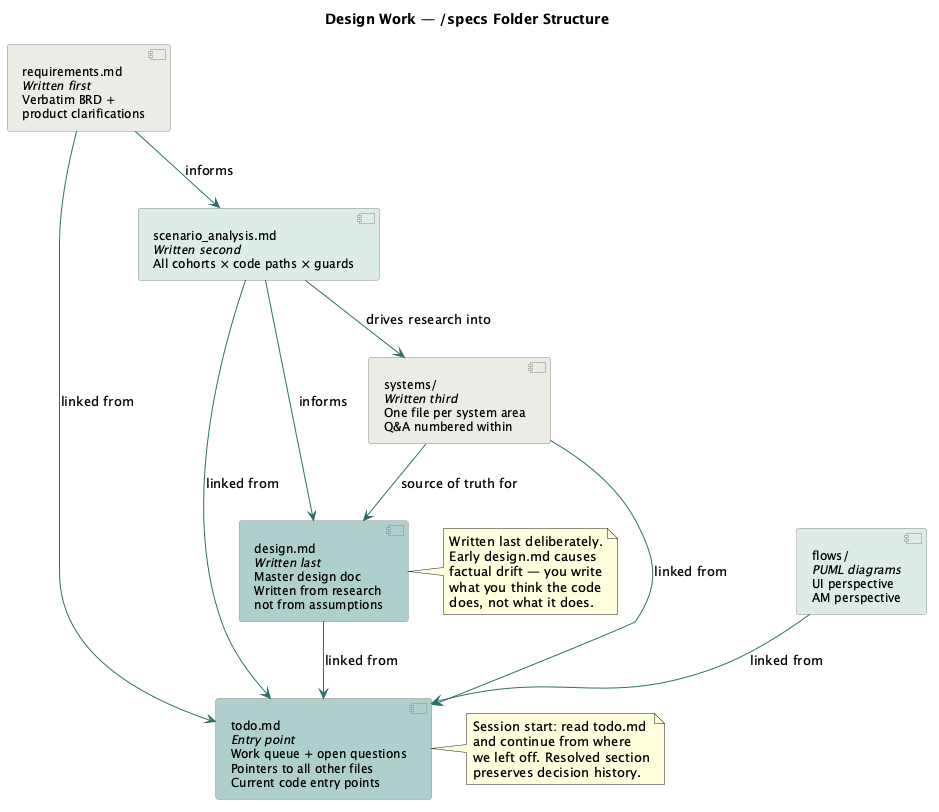
Here is an example of the knowledge-base structure. This simple structure grew organically from the project and became a useful personal standard for multi-service design investigations. More complicated frameworks use agent swarms, but I mostly need something simpler: a way to manage a large volume of context and build a knowledge base across sessions and agents.
specs/<epic>/
├── todo.md              ← Entry point. Work queue + open question tracker.
├── design.md            ← Final design doc. Written LAST.
├── requirements.md      ← Verbatim requirements + product clarifications.
├── test.md              ← Test data and selected cases.
├── systems/             ← Q&A research. One file per system area.
│   ├── first_deposit.md
│   ├── withdrawal_call_chain.md
│   └── balance_fields.md
└── flows/               ← PUML diagrams for deposits and withdrawal flows
todo.md is the anchor file. It has four sections: Index (links to every doc in the folder); Current Starting Points (specific code file paths that represent the current ground truth); Open Questions by category (product/implementation/.NET/waiting); and Resolved Questions with evidence and dates. The initial questions come from requirements.md. I write section headers and question stubs first, then let Claude fill in verified content inside that frame. Those headers and questions limit where Claude can drift. The questions also helped me frame the problem better.
The Resolved section records the decision history, the evidence, and whether I have confirmed each decision as correct.
The systems/ pattern: one file per system area, with tags for numbered questions (Q1, Q9, Q11), all referenced from todo.md and design.md. Instead of asking Claude to re-explore a system area mid-session, I link to the file: “Reparenting mechanics are in systems/reparenting_mechanics.md.”
The design.md document: the final design document from which I create Jira tickets. It outlines the general approach across multiple systems. I initially asked AI to draft it during discovery sessions, then edited it by hand. The editing was substantial because the model kept drifting away from facts. At times, I seriously questioned whether AI was saving any time here or whether it would have been faster to write the document by hand.
The agent added more work for me: structural edits, duplication removal, factual corrections (“this call chain is not correct, update all references and logic”), noise removal, invented-term corrections, abbreviation fixes, style fixes, and assumption fixes. Every correction slowed the process and increased token burn.
Assumptions, Requirements, and Source of Truth
One tendency I have noticed in AI agents is to turn missing context into assumptions or some version of “yes, that’s totally fine, carry on.”
Persistent memory rules helped me override Claude’s default behaviour with something like “do not assume; use code or Confluence documentation to verify.” It is simple and obvious to me, but not really to the model. The rule loads in every session, and it works more often than I expected. It nudges the model from “state the assumption confidently” towards “verify, then state.”
Assumptions still creep in over long sessions. During the long-term design work, Claude would sometimes drift towards confident statements about code behaviour that needed correction once the actual code was read. I started using a dedicated /specs folder as a source of truth for findings, and that helped in long-running investigations. The systems/ files capture verified answers, and todo.md tracks resolved questions with evidence so settled points do not get reopened.
It is also useful to ask the agent to challenge my assumptions:
“I think we should do a hard delete in the xxx table. Try to prove me wrong.”
This prompt gives Claude a specific verification task: look for evidence that contradicts my decision. I still own the decision. Claude checks code, documentation, logs, or data and reports what it found. It is still a bit of a dice roll, but it can surface unexpected issues around the change.
Additionally, mechanical proof matters when writing code. Pre-commit hooks run the full test suite with the race detector and linters both locally and in CI. If a hook fails, the commit does not happen, and the model has to investigate. That gives me evidence, not just the model’s word that everything is fine.
Where the Agent Breaks
The weak points mostly show up when the agent has too much freedom, too little evidence, or too little visibility into its own progress. It often self-corrects when pointed at a particular code file or doc.
Context compaction loses the thread. When a long session fills the window, /compact summarises it and carries on, but the summary is not lossless. After a compaction, the agent may ask again about something settled 400 lines earlier, drop an assumption, or reintroduce a term I already tried to get rid of. The “wait, we already covered this” moment is common.
The fix is to externalise live state into todo.md, design notes, or memory so it survives the summary. In my experience, compaction happens quite often. Overflowing a one-million-token window is not hard during design work or while investigating nasty bugs. A 200K window can go through multiple compactions even on a medium implementation task.
It loops between code and test. When a test fails, the agent can fall into a rut: patch the code, rerun the test, fail again, and patch the same area another way. Without close supervision, it can circle the same few edits instead of stepping back to question the broader fixture or the assumption underneath it. Better models are less prone to this.
The same shape appears in design work when the agent revisits the same flow again and again. Not all cognitive load can be delegated; some problems still need a human to work through them and steer the agent.
It mis-scopes work. If the prompt says “improve this” or “review this” without a boundary, the agent may turn a local fix into an audit, a refactor, or a new architecture pass. For large, vague tasks, the same problem shows up inverted: it may stay too shallow or avoid the design question that matters. I try to give it a maximum scope: files it may touch, files it must not touch, the exact output I want, and the definition of done.
It writes before it understands the repo. Large codebases have old implementations, duplicated code, generated code, shared templates, stale code, specific environment configurations, baked-in assumptions, and feature-specific overrides. The agent can start working on the first plausible-looking file instead of taking the wider view, or it can go too wide and veer into deeper infrastructure than the task requires. Before implementation, it should trace the entry point, list the files it plans to change, and explain why those files are in scope.
Subagents can go dark. A subagent given too much at once can read many files, hit a limit, retry, or stall without a clear signal to the main thread. Parallel agents also make it harder to see which branch of the work is burning tokens or following a bad assumption. Smaller, single-purpose subagent calls with structured results avoid that failure mode. More on subagent handoff risk in Part 2: Teaching Claude Code Your Standards.
The agent sometimes ignores memory. Sometimes the agent just does not use memory that is already in context and decides to do something else. From first principles, that is not surprising because it is still a statistical model, but in practice it feels like the dice rolled the wrong way.
Do I Actually Save Time?

The answer, as always, is “it depends.” Yes, I save time when the scope is well defined, and less so when there is a lot to design from scratch. Modern development has a lot of overhead: Jira management, complex release processes, maintenance, version control, inconsistent environments, flaky tests, and complex workflows. It also carries the cognitive overhead of navigating multiple services, database tables, procedures, and libraries while comparing them to requirements. The agent starts paying off after I invest time in adapting it to my processes.
Task types fall on a spectrum. At one end, work is a clear, repeatable win:
- Ritual work — branch creation, MR setup, timesheet logging, and deploy-ticket creation. It is always mechanical and now automated. This saves time directly. Some of it could also be solved with Bash scripts, including scripts written once by the agent and reused later.
- Ad hoc draft work and one-off scripts — a big win is work that does not need to be production-grade: querying a database, testing performance, checking a hypothesis, or producing a disposable report. If I have an idea and want to test it, Claude can write a script, run it, produce the output, and let me ask follow-up questions in the same interface. I still read the result, but the whole loop can take minutes instead of hours. That feels powerful.
- Cross-repo search — finding every caller across 198 repos used to mean manual Sourcegraph passes; now it can be a single prompt. The agent does not get bored on the 40th file, and it can move across Go, .NET, and SQL. It can still miss obvious points, which is why the harness and verification loop matter.
- Data digging — schema discovery, table linking, and multiple queries to land on a valid test user from the database. It is tedious by hand and exactly the kind of query generation the agent is good at.
The middle category is first-draft work. The agent gets to a draft quickly, but verification and correction can consume the time it saved:
- First-draft code and specs. It gets you 80% of the way quickly, but in a brownfield system with settled conventions, the last 20% carries the real cost. The 542-exchange design document was “written” in an afternoon and finished a week later. It might have been faster by hand.
At the far end, work where it can actually cost you time if you’re not careful:
- Anything you accept without reading. A confident-but-wrong call chain that you take at face value does not just waste the minute it took to generate — it can send a whole exploration down the wrong path for hours or longer.
Faster Does Not Mean Hands-Off
“Did it save time?” mixes two measurements:
- Have I done this task faster?
- Could I work on something else while the agent was running, or did I need to keep watching?
Agents usually improve the first. They search, compare, and draft faster than I can. They do not always improve the second. If I need to correct drift every few turns, the task may finish sooner, but I still spend the day watching it. So while the agent is running, I mostly read the code, specs, docs, and tests so I can review its output and judge the wider impact and risk.
Some effort relocates rather than disappears:
- Verifying agentic output. Every factual claim about the code is worth checking. The model can get call chains wrong, invent terms, or place logic in the wrong file. In the removal project, the read-verify-correct cycle was the single biggest time cost over the weeks — it did not remove the hard part of the work; it changed its shape.
- Knowledge you did not build yourself. If Claude reads a subsystem and you do not, you do not yet know that subsystem. You cannot reliably steer the agent or verify its work unless you stay in the driver’s seat. I can delegate code writing, but I still need to understand the system, and understanding takes time and effort. I don’t have a clean fix for this yet beyond staying in the loop — if I land on one, it’ll be its own post.
- Agent knowledge curation. Spotting a pattern, writing the rule, updating memory, changing configuration, writing new skills, and curating shared conventions all take time. The payoff comes later.
- Reading. Agentic work still creates a lot of reading. Reading chat output all day adds its own cognitive load because every answer raises the same question: what can I trust, and what needs evidence?
That difference showed up in my own work. I could delegate mechanical tasks: branch setup, cross-repo search, timesheet updates, and SQL investigation where mistakes were easy to spot. I stayed close to design and migration work because wrong claims there could change the plan. I read each claim against the code before trusting it. Steering pays off over time: the agent starts following rules such as “do not assume”, “verify in code or docs”, and “ask before making a design choice.” Inside a session, it can adjust to direct corrections. The tiring sessions were mostly long ones, where I had to keep pulling the agent back to the facts and re-reading the same points repeatedly. The task may have finished sooner, but I still spent the day reading, checking, and correcting. On some design work, I think I would have been faster by myself, but at the time I had not curated the model well enough for those workflows.
The first time through a subsystem is slow because the agent does not know your terminology, style, or process rules. The second time is much faster if those corrections went somewhere durable. That is the point of memory files, /specs folders, and skills: they turn this session’s corrections into next session’s defaults.
In my work, the correction overhead on naming, style, and process dropped close to zero once I captured it. On a well-scoped implementation story, that made the agent a clear win. On an open-ended design investigation, the benefit came later, after I understood the system well enough to steer confidently.
What’s Next?
Currently, I am looking into loops and dispatch so the agent can pick up new work, implement changes, conduct a first-pass review, and prepare reports for me. Part of that is figuring out how to use subagents efficiently.
Recently, I switched to Opus 4.8, and yes, it is much better than previous models. When I go back to Sonnet 4.6 to save on costs, the difference is noticeable and sometimes hurts. The most expensive model wins, and that worries me a little. The dark version is a future where a few large players run the ultimate models at a scale that smaller businesses and individuals cannot match. The differentiator stops being skill and becomes access. I hope falling per-token prices keep pushing against that, but the cost gap is real if one wants to run agents at scale.
Back in everyday work, it would be interesting to figure out how I can read less code or receive more-surgical agent output. Reviewing code line by line is a bottleneck, but skipping the review entirely would be too risky: approving changes to a system I understand only through a summary. One idea is to introduce risk weighting for changes and their impact blast radius. How far I can push that depends on how much I can trust the report the model produces. Practically, I do not think we are there yet.
The next generation should be better, but it is worth being clear about where the progress is coming from. Almost all the recent gains in agentic coding come from scale, more data, and a better harness around the model. There are no new core algorithms. People like Yann LeCun are chasing different approaches such as World Models, and that research is the real crux. For now, we have LLMs, and even a very smart LLM — which today’s models are not — still needs ground truth supplied to it. An LLM is a statistical system, so variance will always be there, no matter how large the model is. Until a better algorithm arrives, hallucinations will persist, and the harness will be crucial in minimising them.
For how this fits into the wider skill catalogue across the SDLC, see Part 4: Setting Up Claude Code Across the Whole SDLC.