Technical blog
Teaching Claude Code Your Standards: Memory, Skills, and Subagents
How memory, skills, and subagents manage knowledge in Claude Code — with the actual file structure and rule examples. Part 2 of a series on working with Claude Code in a large brownfield enterprise codebase.
TL;DR: Claude Code sessions are stateless, so continuity has to live on disk. Memory captures knowledge about the codebase and business, skills provide either step-by-step instructions or context on demand, and subagents isolate exploration so the main context uses fewer tokens. This is my approach to knowledge management: turning corrections from one session into defaults for the next. It covers how I write skills, the skills-versus-scripts trade-off, how I maintain memory, and what subagents are good for—and where they lose context.
For the tools/context/permissions layer underneath this, see Part 1: Claude Code’s Agentic Harness.
Skills

The skills I have written fall into two types: workflow skills that run agents through step-by-step instructions, and guide skills that load domain context into the session without explicit commands.
Skills can be organisation-wide, team-wide, project-wide, language-wide, technology-wide, or personal. Shared skills make sense when they encode shared conventions or workflows. But skills are cheap to create, so I usually develop them as I go rather than copy from the web: I complete the task in a normal agent session, then ask the agent to turn that successful workflow into a skill.
I am trying to use AI across the whole SDLC, so the skill set follows the work: spec writing, story kickoff, implementation in Go, .NET, and SQL, UAT environment data setup, QA, searching for valid test data, writing tests, review, deployment tickets, and Claude Code harness maintenance. The skill catalogue used per SDLC phase is covered in Part 4: Setting Up Claude Code Across the Whole SDLC.
Some skills are multi-tool, multi-step workflows. Others are a disciplined way to load conventions before the model starts guessing. When I still do a step by hand, that gap might become the next skill candidate or an update to memory.
I want a working skill set that behaves like a pipeline. A story can start with Jira and a spec, then move through branch setup, call-chain research, implementation, verification, review, and QA handover, with the agent switching to the relevant skill at each step. The goal is not a fully autonomous agent; it is fewer context resets, less repeated instruction, and less hands-on management at each step.
But the bigger gaps in the pipeline are not just missing automation. Human judgement matters. If I do not understand the problem or the system well enough, I cannot reliably steer the agent or verify its output. At the same time, the agent can close that gap faster by tracing the codebase, reading logs, checking documentation, performing initial code reviews, and showing the evidence it found.
I use the agent to investigate, but I catch it turning unknowns into assumptions. It should ask questions once it has checked local evidence and can explain what remains ambiguous. Product questions still go through me to the product team, and unclear specs still go back to my colleagues. I do not want to disturb my teammates with hallucinated questions from an AI. That points to another risk of overusing AI: a developer can start delegating verification of AI output to colleagues, which increases cognitive load for others, especially more senior engineers. The obvious bad version is generating code and opening a merge request without doing self-review first.
Skills vs Scripts
I often hear the argument: “Why use unreliable AI when we could just write a reliable script?” I think that is valid. Here is how it evolved for me.
Take /service-local as an example. I had three services: one orchestrator and two dependencies. All three had changes related to my epic, on different story branches. The changes were still in flight and not deployed, so I could not test them in the environment, but I could run them locally. I first got the system running locally with Claude Code, using README.md and an ordinary session. I then captured that successful workflow as /service-local, which lets me specify the services and branches I want it to run together locally.
Then I think: maybe this is not reliable enough, and this could be a script so I do not have to ask an AI each time. I ask Claude Code to write the script from the skill. The script works, but it is clunky to use and does not cover all my use cases. So I move one step further and build a small TUI in Go over multiple sessions. That takes more time to build and maintain than simply supplying the skill and steering the agent with a few corrections. In this workflow, I have too many edge cases and variants, so the skill stays more flexible than the script. Eventually, I dropped my TUI app and now use the skill because it gets me results faster.
That said, there are caveats. This example is about experimenting and building a helper for my own work while I stay in the loop and observe the results. There is a strong argument for using scripts when a workflow must be robust or operate as a black box. In the end, the two work well together: flexible AI intelligence combined with the hard guardrails of code.
Deterministic Tooling
The better question is when to keep prompting the agent and when to turn the repeated step into a script. If the action is deterministic and repeated often, a small script usually wins. The agent can still write or maintain that script.
Cron jobs are another useful pattern. A cron job can prompt the agent to check something and act only when a condition changes. I found this useful for curating documentation drift while working on code.
Brownfield work stays hard because the system is large. If you already know the system deeply, the agent can make existing workflows much faster. If you do not, the agent can accelerate the learning, but you still need to read, question, and steer.
AI saves time when the work is scoped, the evidence is checked, and useful corrections become memory, skills, or specs. AI maintenance becomes one more engineering chore.
Memory: Teaching AI Your Standards
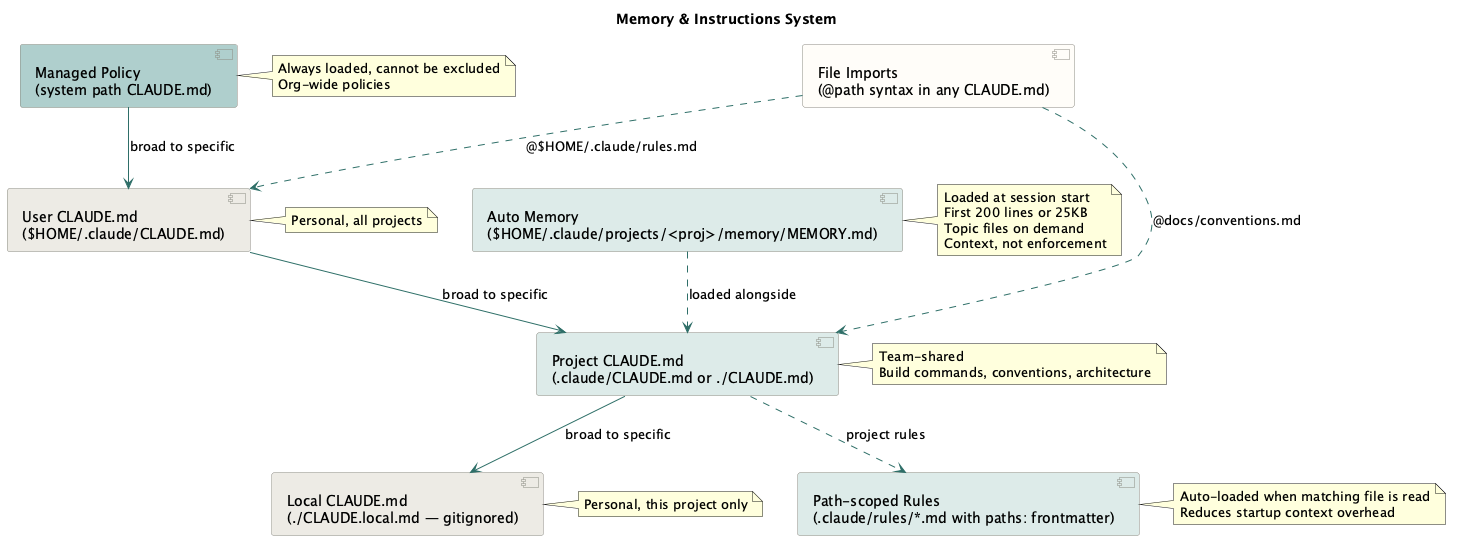
Claude Code sessions are stateless. Each session starts with a fresh context window, so the model does not automatically retain yesterday’s corrections, environment facts, or project state. I give it continuity through files on disk.
~/.claude/CLAUDE.mdis the global memory. I normally manage it by hand. It holds global rules I want in every project: environment facts, hard prohibitions, architecture rules, and my writing style.- Auto memory is the Claude-written layer. In each session, I explicitly prompt it to “remember to do X, don’t do Y.” This captures corrections and durable discoveries in
~/.claude/projects/<project>/memory/. In a sense, it also becomes my own notepad, holding guides and workflow rules. After long sessions, I can ask it to propose memory updates based on the mistakes I corrected. Recently, I started drilling into why the mistake happened and trying to patch that pattern. That reduces some friction, but there are still limits to how reliably the model follows all of these instructions.
Memory is context, not enforcement. Claude mostly follows clear memory rules, but a rule like “never write to the shared UAT database” also belongs in permissions, hooks, or database access control. It is great when the model does not even try to do something silly, because that saves time and tokens, but stronger protection should exist at the permission level or, better, the organisational level. For example, we do not allow pushes to the main branch by default. See the memory docs for the full reference.
In practice, my setup has three locations: one global user file, one auto-memory project for the Go service tree, and one auto-memory project for the .NET back-office tree.
~/.claude/
├── CLAUDE.md                         ← hand-written global rules
└── projects/
    ├── <go-service-tree>/memory/
    │   ├── MEMORY.md                 ← index loaded at startup
    │   ├── feedback_no_confab.md     ← one correction
    │   ├── reference_db_flow.md      ← one stable fact
    │   └── ...
    └── <dotnet-backoffice-tree>/memory/
        ├── MEMORY.md
        ├── feedback_no_auto_push.md
        ├── reference_deploy_flow.md
        └── ...
The official docs describe auto memory as scoped per Git repository. That detail matters in my setup because that is not how I use it. I launch Claude from a parent folder that contains many microservice repositories. One project can then carry shared conventions across the whole service tree instead of fragmenting into one project per repo.
Only part of auto memory loads at startup: the first 200 lines of MEMORY.md, or the first 25 KB, whichever comes first. MEMORY.md acts as the index. Topic files beside it are not all loaded immediately; Claude reads them later with normal file tools when the index or the task points there. When the interface says “Recalled memory,” Claude is actively reading from the auto-memory directory. See Auto Memory for details.
Auto-memory files are managed by Claude Code and use the following structure:
namedescriptionmetadata.type
Each file uses one of these type prefixes:
feedback— corrections and confirmed working methods. This is most of my project memory.reference— stable lookup facts, such as the steps for a release flow or a known-good UAT account shape.project— state of work in flight that the repo does not record.
The Go project memory has accumulated 35+ feedback files. Some are tiny preferences, like not suggesting specific tools because they simply are not installed. Others encode stronger working rules: use repository names for services, do not invent abbreviations, provide filepath:line evidence for every code claim, and read the code to verify before flagging an issue.
Two rule examples matter a lot. First, “verify before flagging”: if Claude finds a file that may have an issue, it should read the file and decide, rather than hand me a vague “worth checking” note. Second, “do not echo the user’s reasoning back as confirmation”: if I say, “Maybe we do not need that backfill script,” Claude should test the idea against code and data before agreeing. In one session, that habit caught a real bug: a proposed backfill would have set a flag incorrectly for affected customers. Claude surfaced it because it checked the implementation and data across multiple sources quickly instead of just politely agreeing.
Freshness matters. Behavioural preferences age slowly; code observations age quickly. “Do not use python” may remain useful for months. “This method calls X” can become stale after one refactor. For code claims, I prefer memory to store navigation strategy and verification rules, not frozen line-level facts that the agent can re-read from the repo. That is why the approach of indexing the codebase into CLAUDE.md usually does not work for me. It mostly introduces duplication that goes stale quickly.
Memory needs maintenance. I keep a few rules for it:
- Deduplicate before writing a new memory.
- Delete memories that turn out wrong or stale.
- Do not memorize what the repo already records.
- Keep hard guardrails in the user’s
CLAUDE.md, permissions, hooks, or platform controls. - Keep the user’s
MEMORY.mdlean so the startup index stays useful.
/memory is the audit path. It lists the loaded CLAUDE.md, CLAUDE.local.md, and rules files, lets me toggle auto memory, and opens the auto-memory folder so I can prune stale or oversized entries.
The payoff is quiet but real. feedback_* files stop the same mistakes from repeating, while reference_* and project_* files front-load context that is expensive to reconstruct and cheap to store. Every correction captured once is one less correction in the next session.
Context Delegation Through Subagents?
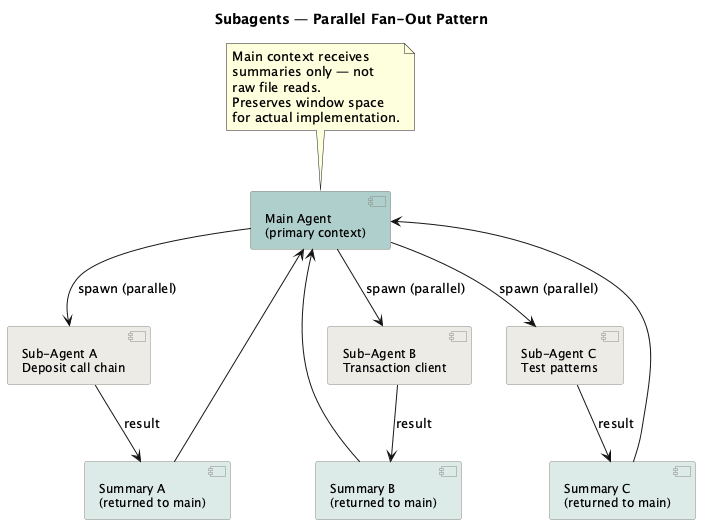
I treat a subagent as a separate agent context that the main session can delegate to. The official docs describe subagents as Markdown-defined agents with YAML frontmatter: name, description, model, tools, permission mode, skills, hooks, memory, and turn limits. The body of the file becomes the subagent’s system prompt.
A subagent starts in the main session’s current working directory, but it does not get the full main Claude Code system prompt or the whole conversation history. It runs its own tool loop, keeps intermediate reads and tool output inside its own context, then returns a final summary to the parent session.
This saves tokens because the main thread gets the result, not every file read along the way. It also creates the main risk: the subagent does not automatically carry the main session’s working memory, recent corrections, or local reasoning. Unless the parent prompt passes that context in, or the subagent has it configured, it is more likely to fill gaps with assumptions or return findings that still need verification. Docs: subagents, feature overview.
Subagents only know what the parent prompt passes in, so they can lose context. I cannot easily watch and correct the full subagent conversation while it runs. Vague “be an expert reviewer” prompts do less than tight task prompts. One approach is to treat subagents like functions, not people. Give the input, define the output, require filepath:line evidence, and ask for a “not verified” list. Instead of reading all relevant files in the main session, I can ask subagents to handle bounded exploration: the call chain, transaction-query client contracts, or existing test patterns. The main context gets a compact briefing, which preserves room for implementation. The cost is handoff risk. A summary can hide uncertainty, and the main agent can treat a weak finding as stronger than it is. That happens often enough to need an explicit verification step.
What I am not reaching for yet is swarms. In my environment, fully unsupervised swarms would probably create more correction overhead than they save. I can give the agent more autonomy only when the domain is encoded in memory files, skills, and spec folders. The more that is written down, the less the agent has to assume. Gaps remain: the model might still fail to follow one of the auto-memory files, for example.
For what all this looks like in a real long-running investigation, see Part 3: Opinions on Agentic Coding.
Further Reading
- Agent Skills — Addy Osmani on agent skills management