Technical blog
Claude Code's Agentic Harness: Tools, Context, and Permissions
The mechanics behind Claude Code: MCP versus CLI tools, context-window budgeting, project and settings scoping, and the permission system. Part 1 of a series on working with Claude Code in a large brownfield enterprise codebase.
TL;DR: Claude Code is a model in an agentic loop with access to your filesystem, shell, and tools. The work of using it well is deciding what it can see (context), which tools it can run (and under which permissions), and where state lives outside the chat (settings and project structure). This covers the plumbing: MCP-versus-CLI trade-offs, how the context window actually gets spent, how the agent’s internal configuration in .claude/ is structured, how user settings work, and how the permission-and-hook pipeline decides what to run.
For how memory and skills build on top of this, see Part 2: Teaching Claude Code Your Standards. For where the underlying models and agentic-loop research came from, see Part 5: A Short History of LLM Agentic Research.
What Is Claude Code?
Agent = Model + Harness. If you’re not the model, you’re the harness. — Viv Trivedy
Claude Code is an app with several interfaces, mostly centred on terminal use, that puts an AI model in an agentic loop with access to your filesystem, shell, and configurable external tools. It reads, writes, searches, and executes. In simple terms, the loop is: think, call a tool, observe the result, and think again until the task is done or the context is exhausted.
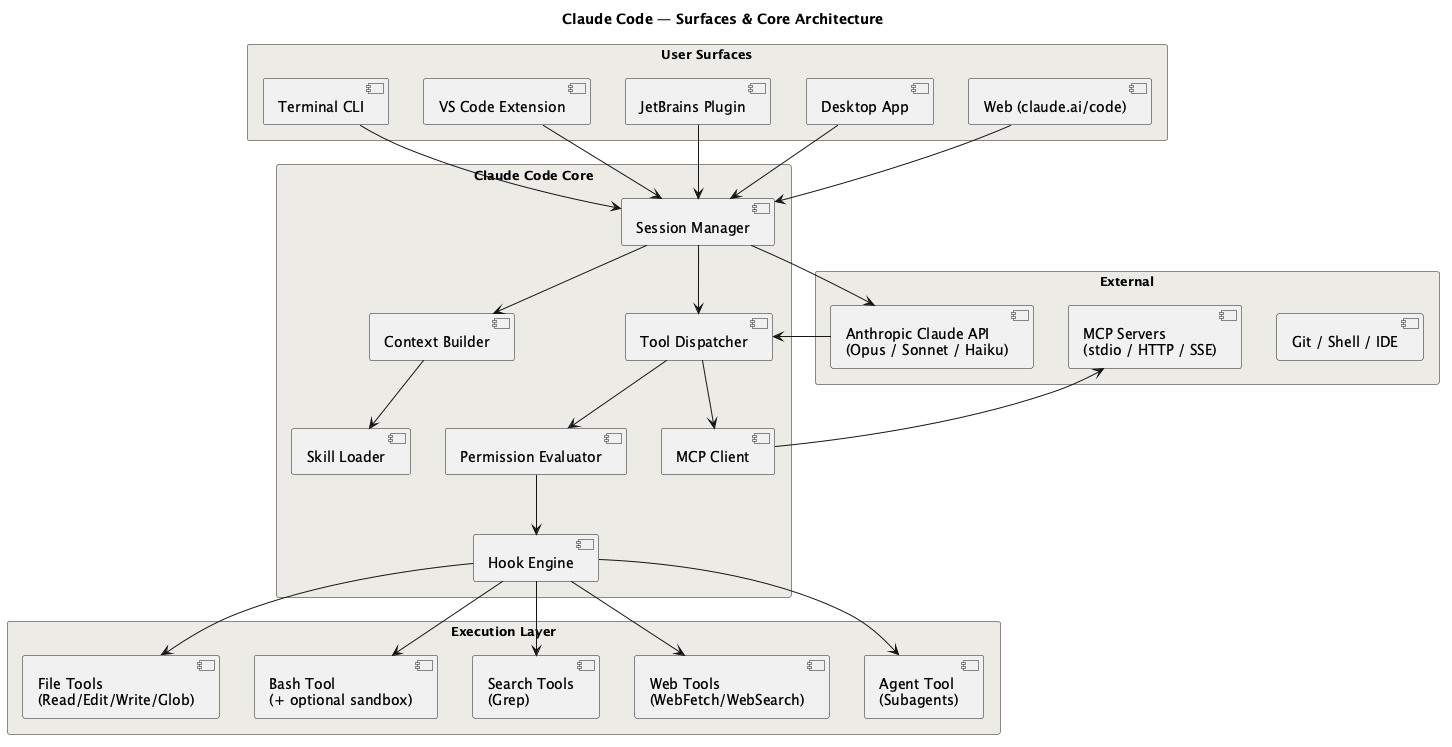
Claude Code has to coordinate several problems at once:
- The agent loop — turning a single request into a sequence of tool calls, with the model deciding the next step from the last result.
- Model access — authenticating to the model provider. Claude can connect directly to Anthropic through a plan or API. In enterprise setups it often runs through Vertex AI, AWS Bedrock, or a similar managed route with the organisation’s model whitelist and policy rules enforced.
- Permissions — every Read/Write/Bash/tool call is gated by policy before it runs, so the agent cannot quietly do something destructive. The system prompts the user before a tool call runs. This is a hard stop.
- Context — what the model sees, what gets compacted, and what has to live outside the chat.
- Context window management — keeping the finite window full of the right knowledge and compacting when it fills.
- Context supply — pulling relevant files, Jira tickets, and docs into that window for the task at hand.
- Tools — built-in file and shell tools, MCP servers, CLI tools, and direct API calls.
- Configuration and permissions — where Claude stores state, which actions prompt, and which actions are blocked.
- Memory, skills, and subagents — the reusable layer that turns repeated corrections into future defaults. Memory can define rules from session to session. In permission terms, it is a soft stop.
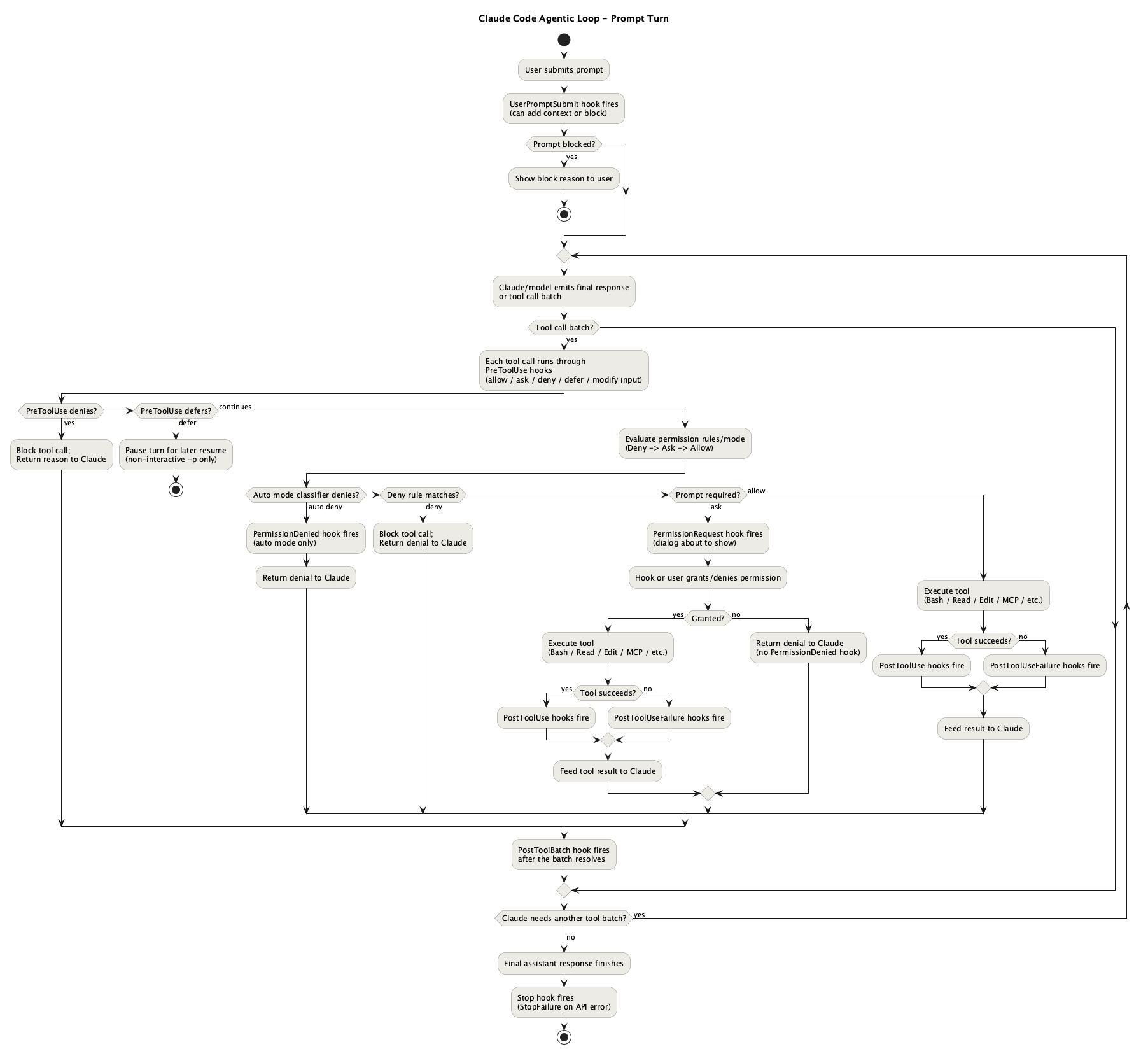
Claude Code already provides the model and the tool loop. The work is deciding what it can see, what it can run, what it should remember, and when it has to stop and ask. That happens through tool calling, context, filesystem scope, permissions, skills, memory, and subagents. Memory, skills, and subagents are covered in Part 2: Teaching Claude Code Your Standards; the rest is below.
Tools: MCP vs CLI
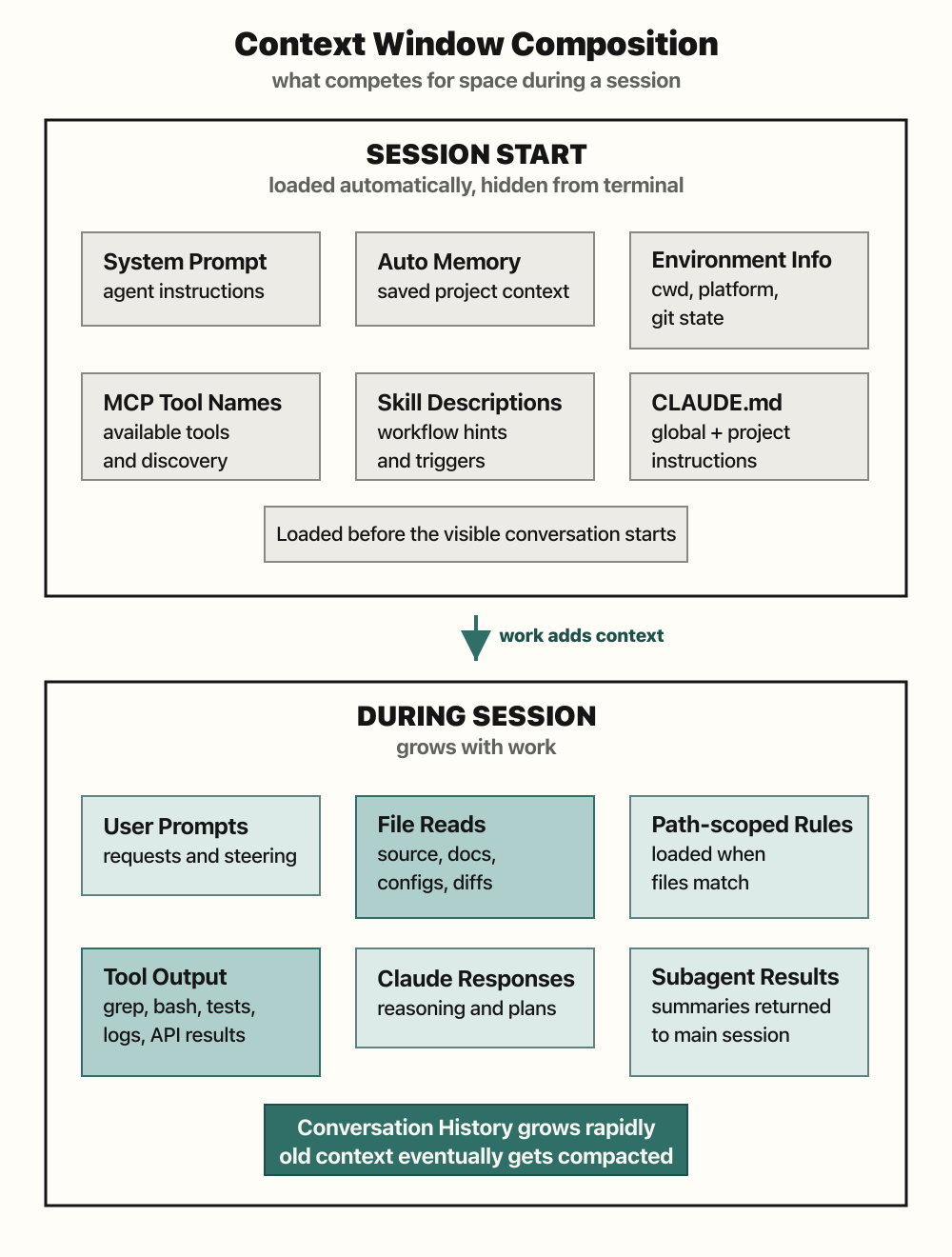
MCP has an upfront context cost: every connected server can put its tool definitions into the context window before you have done any work. You do not pay that cost just once. Tool definitions re-enter context on model calls because the model needs the schema to decide what to call next. This has a name: the context tax.
The GitHub MCP is an extreme example. At one point it accounted for ~42,000 tokens in tool-definition schemas. Benchmarks put a typical session with 5–10 MCPs at 50,000–67,000 tokens consumed before the user types anything—up to a third of a 200K window gone before a single file is read. One measurement found three MCP servers consuming 143K of 200K tokens: 72% of the context window spent on definitions, leaving 57K for actual work.
Anthropic shipped a fix in January 2026: MCP Tool Search, which defers loading tool definitions until they are needed. If tool descriptions exceed a 10K token threshold, tools are marked defer_loading: true and discovered on demand. Internal benchmarks showed ~77K tokens with full upfront loading down to ~8.7K with Tool Search — an 85% reduction. Tool Search now runs by default.
Even with Tool Search, the practical rule holds: only connect MCP servers you actually use day-to-day or genuinely need for auth and cross-system access.
Many providers that now expose MCP tools already have a long-standing CLI, and LLMs can usually run it well. Models were trained on huge amounts of CLI material, so they already know git, gh, grep, docker, and kubectl. CLI tools add no schema overhead and no discovery step. If a CLI is unusual or recently changed, the agent can read --help first or I can wrap it in a short skill, which I have done for several daily scripts.
CLI also composes naturally through pipes. MCP has no native chaining primitive. As context windows get larger and cheaper, the token-tax argument weakens, but the reliability and composability arguments remain. In practice I use a mix of MCP and CLI tools, plus a few small wrappers that Claude Code built for me, such as a Jenkins helper that saves me from switching between terminal and browser.
Context Window
The context window is the model’s working memory for the current session. It contains the conversation, system instructions, loaded memory, tool schemas, file reads, command output, MCP responses, and any docs or tickets the agent pulled in. Every new piece of context competes with every other piece. An MCP schema, a long stack trace, and a design note all sit in the same budget.
Large windows help, but they do not remove the need for curation. More context can mean better answers, but it also means slower turns, higher cost, more text for me to review, and more room for the model to miss facts: the needle-in-a-haystack problem. In practice, a 200K window can disappear quickly during a medium implementation, and a one-million-token window can still overflow during a longer design session.
Some rough token math is useful here. A 300-line code file with 8,000 characters is roughly 2,000 to 2,500 tokens, depending on the language and model. A 200K window could theoretically hold dozens of such files if it held nothing else, but real sessions also carry prompts, tool schemas, command output, responses, and history. If only half the window is realistically available for file content, the practical range gets much smaller. A one-million-token ceiling feels more workable, especially when a legacy codebase contains 5,000-line files. Even then, Claude Code usually does not read the whole file. It greps, slices around relevant terms, reads the first chunk, and decides whether to go deeper. It can still break, though. Sourcegraph MCP can fetch a raw file with thousands of lines and overwhelm the context.
The habit that matters more is keeping durable state outside the chat. todo.md, systems/ files, memory, and skills let the agent reload the current truth without replaying the whole conversation. After compaction, I assume some nuance may be gone and ask the agent to re-read that external state before continuing.
Context management is not just “make the window bigger.” It is deciding what belongs in the window now, what should live in a file, and what should be re-read from source when accuracy matters.
Projects and Structure

I initially found Claude Code’s project terminology confusing. A “project” really is the working directory where you start the CLI. Claude scopes state around that directory and may create .claude/ there. That directory does not have to be a Git repository, although the official docs imply that it often is.
The docs often assume the working directory is a checked-out repo and that shared Claude files can be committed with the code. That does not match my setup. Our codebase has hundreds of microservices, many of them following shared templates and architectural groupings, so I usually start Claude one layer up. The Go parent folder and the separate .NET parent folder carry different saved permissions, memories, naming conventions, tools, and build constraints, while both share global memory.
Shared rules stay at the user level where they apply across both worlds, for example because both call into the same database. I also manage broad permissions at the user level. That keeps the experience consistent and avoids re-allowing the same operations or saving the same memory rules in each working directory. The files Claude can use at the project level are:
Project (current working directory)
| File | Purpose | Source control |
|---|---|---|
.claude/settings.json | Shared project settings: permissions, hooks, env vars for this working directory | Docs assume this can be checked into source control; in my setup it may live at parent-folder level instead |
.claude/settings.local.json | Local per-dev project settings: saved approvals/overrides for this working directory | No; Claude adds it to .gitignore when it creates the file |
.claude/rules/*.md | File/folder-specific instructions split out of CLAUDE.md | Project-scoped; commit/share only if the team should inherit them |
.claude/skills/{skill-name}/{skill-name}.md | Custom project skills/workflows | Docs describe project skills as shared via git; use ~/.claude/skills/ for personal skills |
.claude/CLAUDE.md or CLAUDE.md | Project instructions: build commands, conventions, code style, context that can’t be inferred from the code | Docs describe project instructions as shared via source control |
.mcp.json | Project MCP server definitions | Yes for project-scoped MCP; use local/user MCP scope for private servers |
Ignoring enterprise-managed settings, precedence is: command-line overrides → local project (.claude/settings.local.json) → shared project (.claude/settings.json) → user (~/.claude/settings.json).
User (~/.claude/ and ~/.claude.json)
| File | Purpose |
|---|---|
~/.claude/settings.json | User global settings for all projects: permissions, hook definitions, env values |
~/.claude/CLAUDE.md | Global user memory/instructions loaded for all projects |
~/.claude/skills/ | User global skills |
~/.claude.json | Claude Code state file: OAuth session, user-scoped global MCP servers, local per-project MCP servers, project-keyed state |
~/.claude/projects/<project>/memory/ | Auto memory: Claude-written project memory with MEMORY.md as the index |
The confusing pair is ~/.claude/settings.json versus ~/.claude.json. The first is editable configuration: permissions, env values applied to Claude Code sessions and subprocesses, and permission-hook definitions. Hooks are configured in JSON, but the handler can call a script wherever you keep it; there is no standalone hooks file for normal user or project configuration.
~/.claude.json is Claude’s private state file. It stores MCP registrations (--scope user for global MCP, --scope local for the current project) plus project-keyed choices such as allowed tools and trust. That state is per project, but it is not a project-settings file.
Plugins are the packaging layer over all of this. A plugin is a separate directory with .claude-plugin/plugin.json; its components live at the plugin root, such as skills/, agents/, hooks/hooks.json, .mcp.json, bin/, and optional plugin settings. Standalone .claude/ files are better for quick project or personal setup. Plugins make sense when the same extension should be versioned, reused across projects, or distributed to other people.
Overall, Claude Code gives you a flexible configuration system coupled to the filesystem.
Permission System
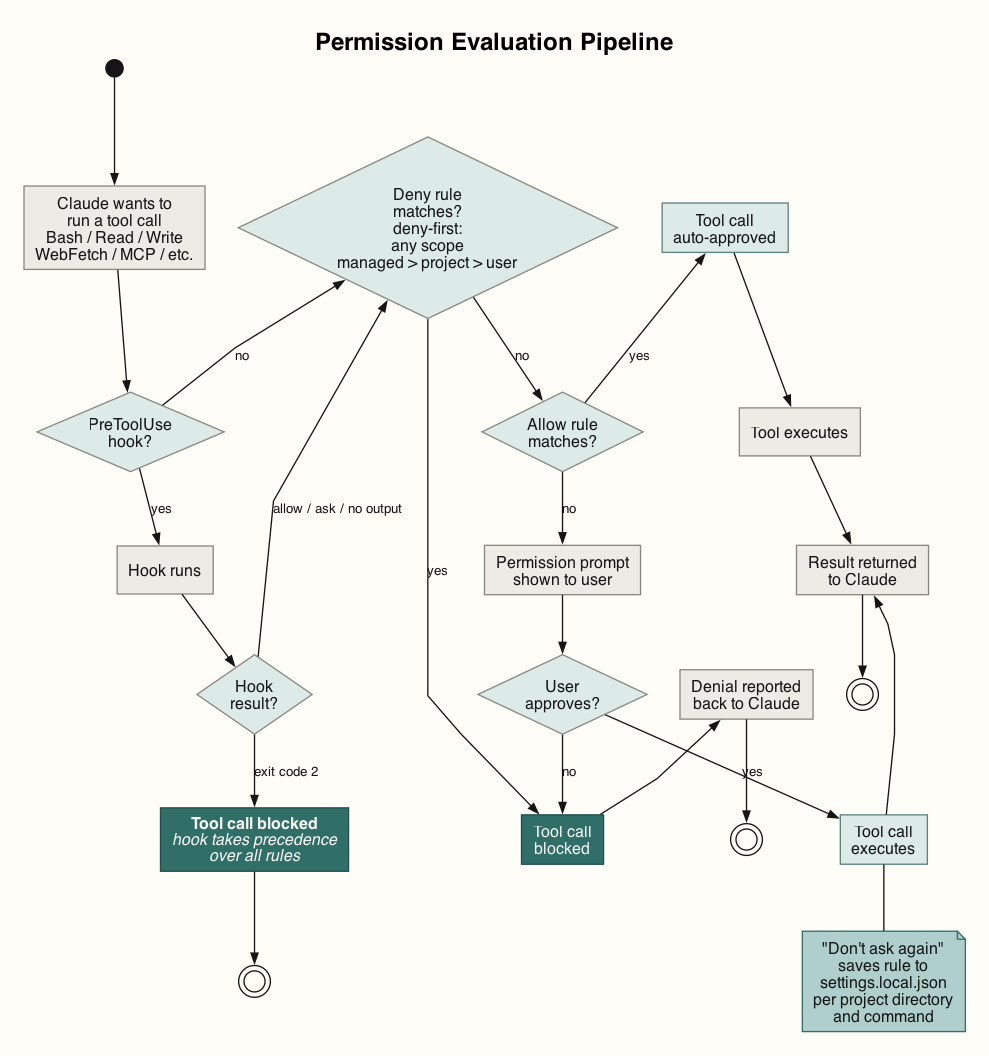
Claude Code checks every tool call against a permission rule before execution. Write operations, Bash calls, and web fetches prompt unless an allow rule covers them. Reads can prompt too, and adding a blanket Read allow to user settings was one of the first things I did to support cross-service code examination. Rules live in settings files at project and user scope and follow a deny-first precedence across managed → project → user scopes. See the permissions docs for the full reference.
One current rough edge: compound shell commands. A rule permitting Bash(safe-cmd *) does not cover safe-cmd && other-safe-cmd — each subcommand is matched independently. Custom bash hook scripts can extend approvals for compound commands when each part is safe by itself.
Permissions reduce risk, but they also interrupt legitimate work. The interruption becomes more visible with subagents or parallel sessions. The opposite risk is worse: some actions affect shared state and are hard to unwind. Force-pushing a remote branch after a squashed rebase without a backup is the kind of action where I want the agent to ask first.
In practice, modern models can work well with auto mode or broad allowances. Auto mode is the compromise between prompt fatigue and bypassing permissions entirely. Claude keeps working without prompting, but a separate classifier reviews non-trivial actions before they run. By default it trusts the working directory and, where present, the current repo’s remotes. Production deploys, force pushes, external exfiltration, IAM changes, and irreversible destruction are blocked unless the environment is configured.
In Git projects, auto mode does not treat every push as dangerous. It can allow pushes to the current branch or a branch Claude created, but blocks force-pushes and direct pushes to main by default. It is useful for long routine tasks, but it is not a policy engine: durable boundaries still belong in deny rules, managed settings, and organisation-level controls. In our setup, direct pushes to main branches are already blocked, so what a developer cannot do, the agent cannot do either.
In my current setup, every Bash call runs through a two-stage hook pipeline:
Claude wants to run Bash
    ↓
bash-deny.sh  — blocks: rm -rf, git reset --hard...
    ↓ (if not blocked)
bash-allow.sh — auto-approves: safe commands and compound commands where each is safe by itself
    ↓ (if not auto-approved)
Permission prompt shown to user
The deny hook runs first, and the auto-approve hook runs second. Only genuinely unknown commands reach the user. The settings.local.json allow-list grows over time — each approval can be saved so it never prompts again — so routine prompts become less frequent as you go.
The balance I want from permissions is fewer routine prompts and stronger stops on actions that can damage shared state. Agentic workflows make many local mistakes cheap to reverse, but shared-state actions need a different boundary.
For how this harness gets configured for an enterprise team’s actual skill catalogue, see Part 2: Teaching Claude Code Your Standards and Part 4: Setting Up Claude Code Across the Whole SDLC.
Further Reading
- Agent Harness Engineering
- Claude Code docs — memory system, hook configuration, workflow patterns
- OpenCode — terminal agent, works with many model providers
- Aider — Git-native terminal coding agent
- Cline — VS Code agentic coding extension
- OpenHands — autonomous agent for delegated feature work